How to Block PO Box Addresses on Shopify (and Fix Orders That Already Have One)
You ship with UPS. A customer types PO Box 412 into the address field and pays.
Then the label won't buy. Or it buys, and the parcel comes back with an address correction.
You can block PO boxes on Shopify at checkout now, with Shopify's own rule. Some pages still say there's no way to do it. That changed in June 2026. And for the orders that already have a PO box on them, there's a separate fix, before anyone buys the label.
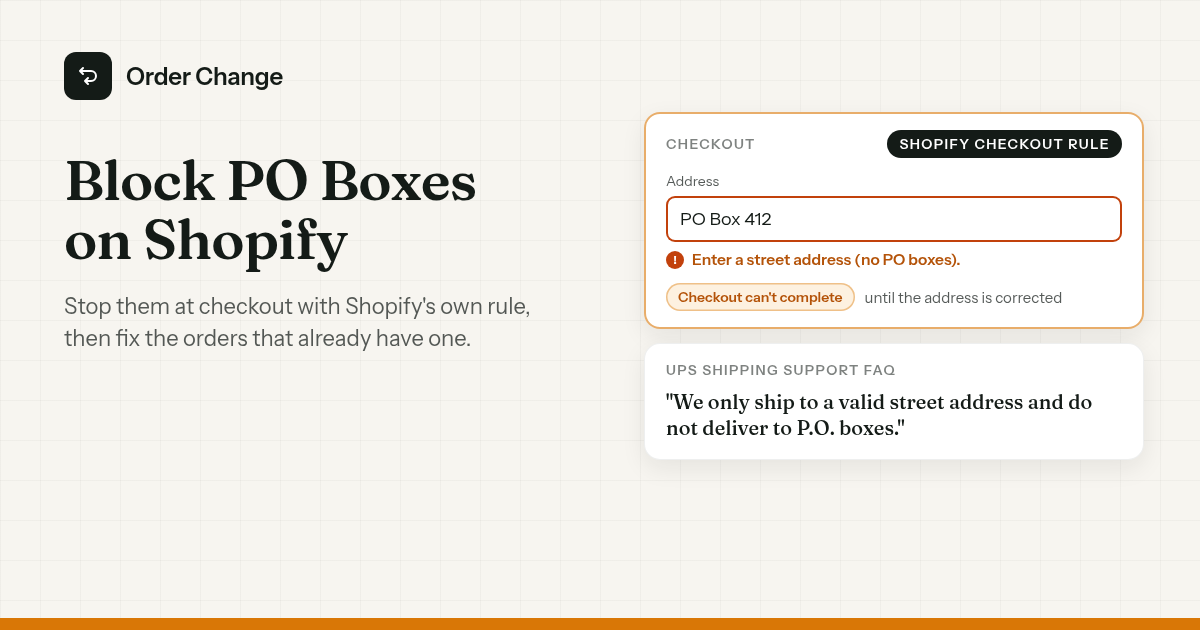
The short version. There are two jobs, and they're separate.
- Block it at checkout. Shopify has a built-in rule under Settings > Checkout > Checkout rules > Address format validation. Pick the PO box address type and set the rule to Active. Then customers see an error and can't finish checkout until they enter a different address.
- Fix the ones that got through. Orders placed before you turned the rule on, or while it was off, still have the PO box. Change the address before the label is bought.
Why UPS won't deliver to a PO box from your Shopify store
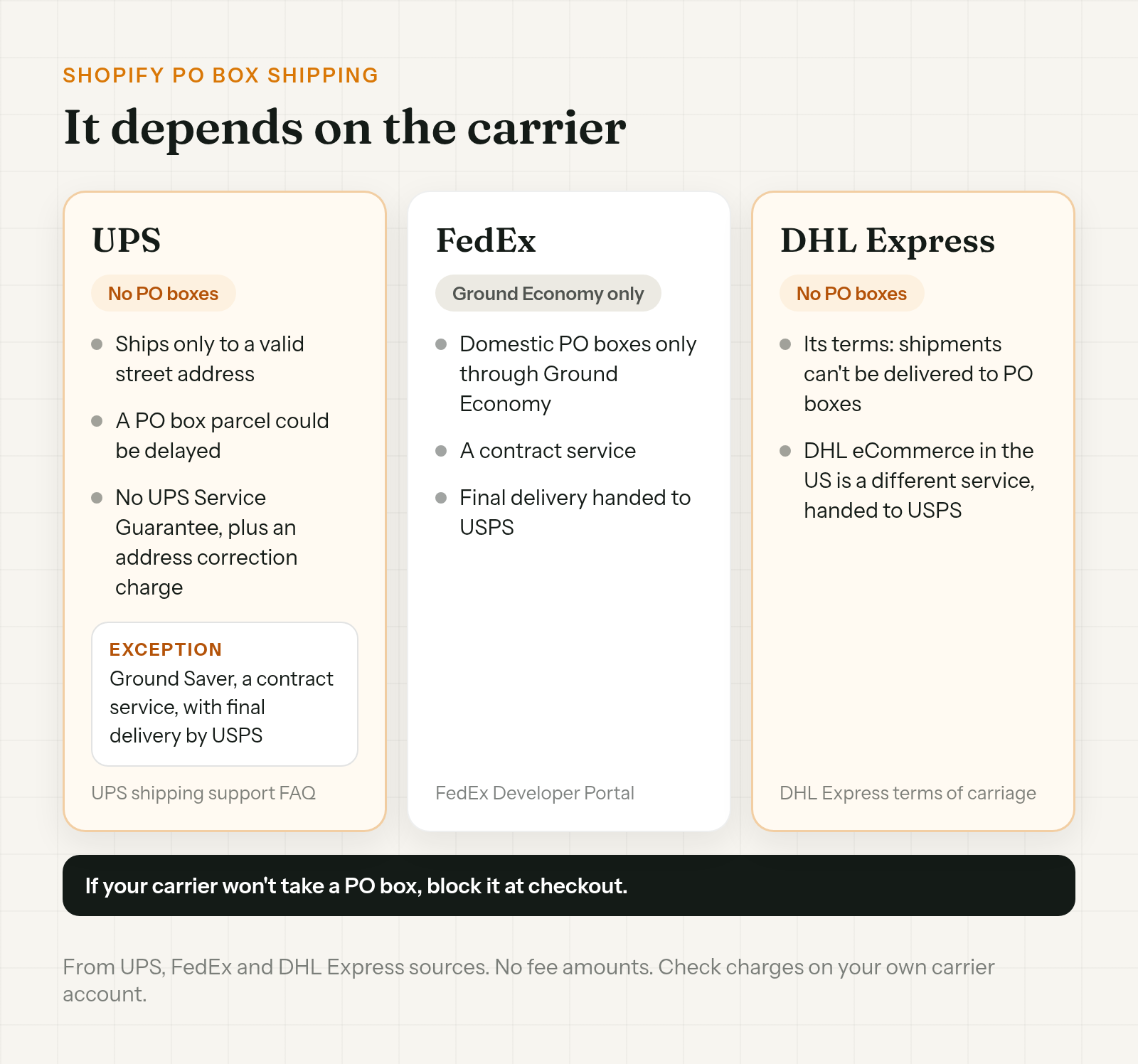
UPS says it plainly: "We only ship to a valid street address and do not deliver to P.O. boxes."
If a parcel goes out to one anyway, UPS says it "could be delayed, won't be covered by any UPS Service Guarantee and will require an address correction charge." UPS doesn't give the amount on that page, so check your own account.
There's one UPS exception. UPS Ground Saver, formerly SurePost, can deliver to US PO boxes, with final delivery by USPS. It's a contract service under UPS's terms.
Other carriers:
- FedEx. FedEx routes domestic PO box deliveries through Ground Economy only, a contract service that hands final delivery to USPS.
- DHL Express. Its terms say shipments can't be delivered to PO boxes. DHL eCommerce in the US is a different service that hands parcels to USPS.
So Shopify PO box shipping depends on the carrier. If every order goes by UPS, a PO box is a problem the moment it's typed in.
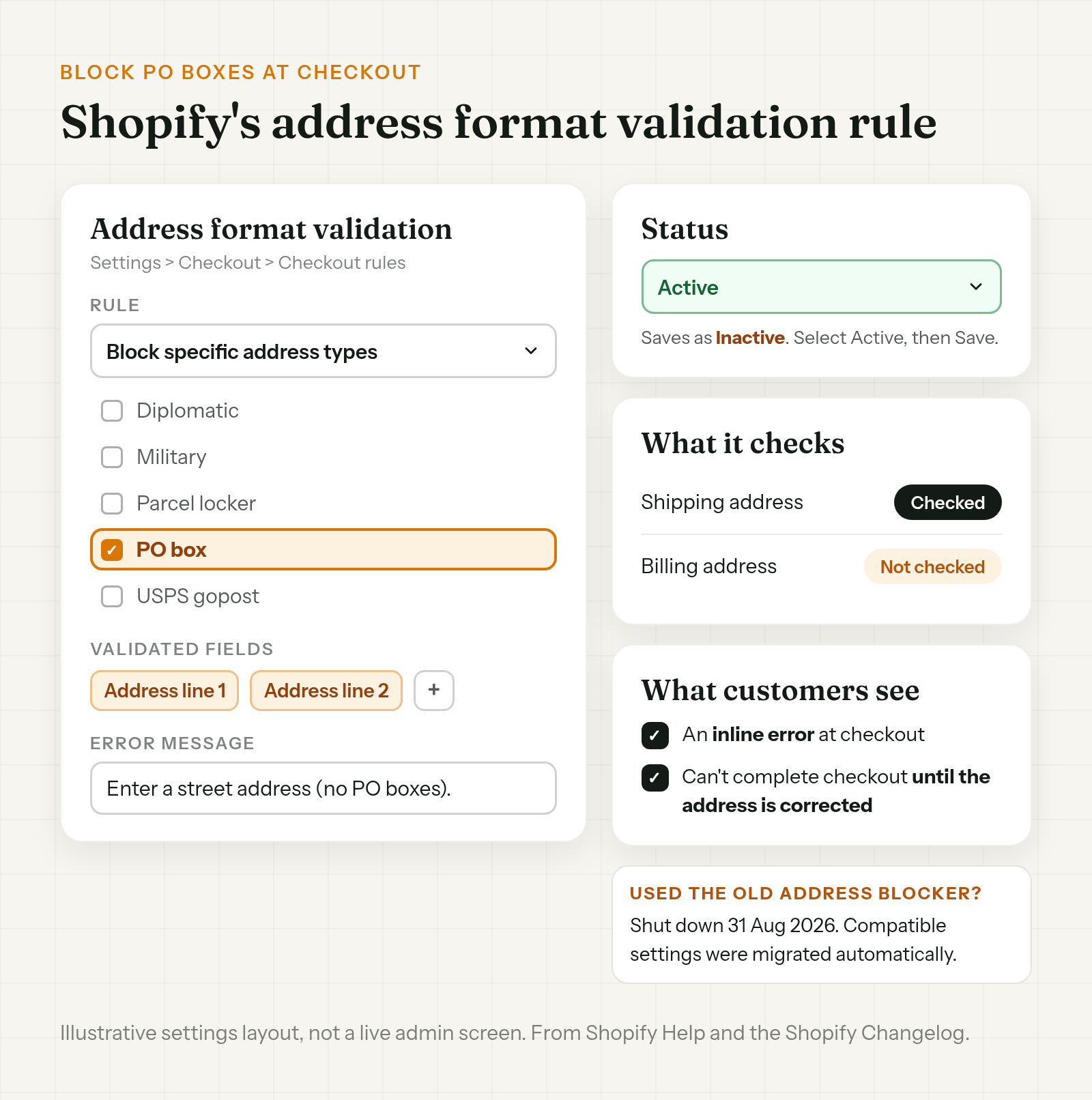
How to block PO boxes on Shopify at checkout
Shopify added address format validation to Checkout Blocks in June 2026. Shopify's changelog says it's available to all merchants. If you don't see it under Checkout rules, ask Shopify Support.
To set it up:
- Go to Settings > Checkout > Checkout rules > Address format validation.
- Use the rule Block specific address types and pick PO box. The same rule also lists diplomatic, military, parcel locker and USPS gopost addresses.
- Pick the address fields the rule checks. In the Validated fields section, click the + icon and add address line 1 and address line 2. If you only pick line 1, a PO box typed on line 2 gets through.
- Write the error message customers will see. Shopify's own example: "Enter a street address (no PO boxes)."
- Click Save. Shopify saves the rule as Inactive, so select Active from the status dropdown and click Save again.
- Then test it (next section).
What customers see: an inline error, and they can't complete checkout until the address is corrected. Shopify says this applies across online and "agentic" checkouts.
Two limits to know:
- Shipping addresses only. Shopify validates the shipping address. The billing address isn't checked, so a PO box in billing goes through.
- Strict rules can block real addresses. The same page has other rules, such as blocking ZIP or postal codes with wildcards like
100**, character counts, required fields and custom regex. Shopify warns that an overly strict regex can block valid addresses. If an order already has the wrong ZIP, see how to fix a wrong ZIP code on a Shopify order.
If you set up the old Checkout Blocks Address Blocker, it was deprecated and shut down on 31 Aug 2026. Shopify says compatible settings were migrated automatically. Open the new path and check your PO box rule is there.
Test the rule before you trust it
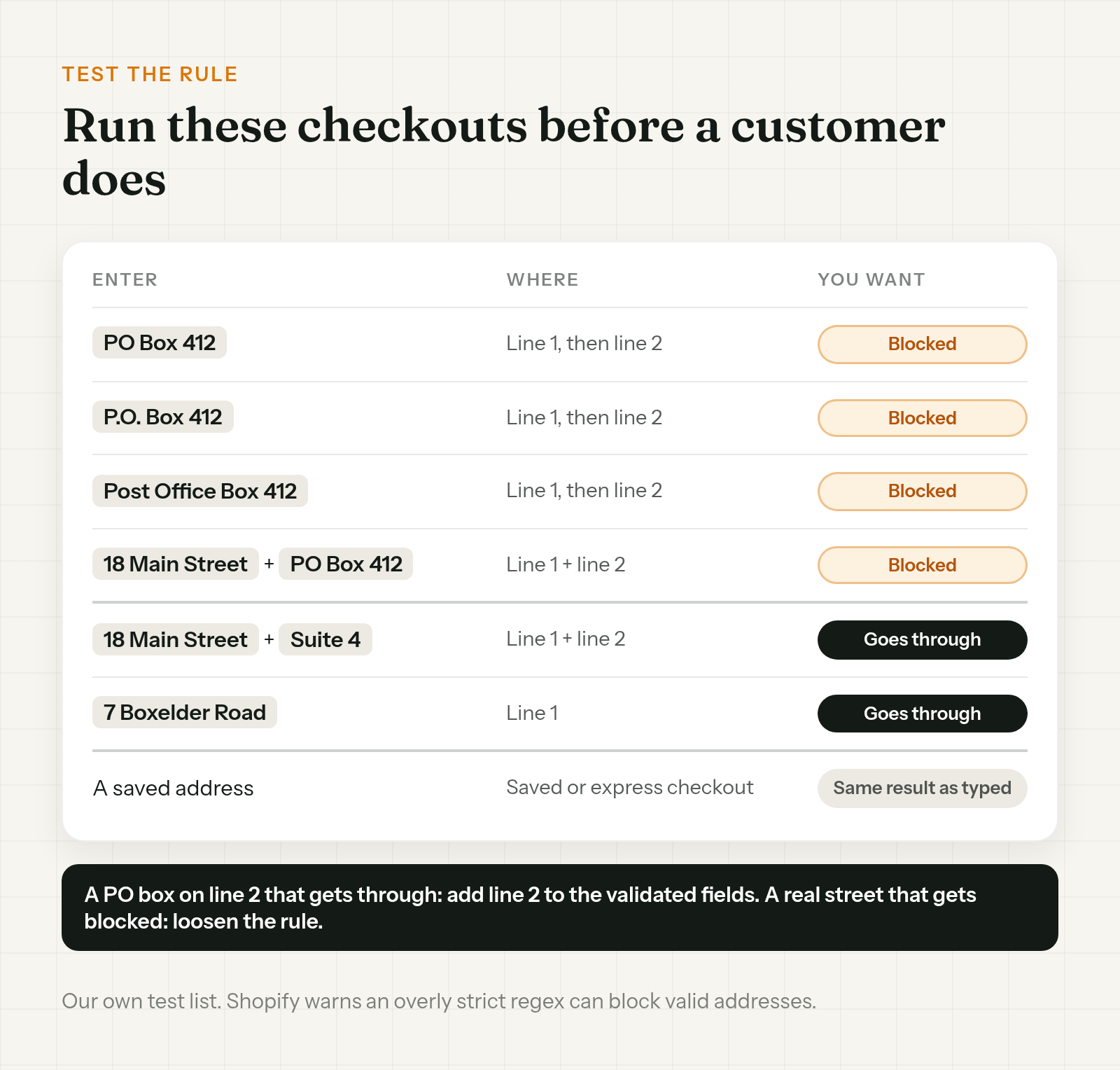
Run a few test checkouts before a real customer meets the rule. Our list:
- The common spellings. PO Box, P.O. Box and Post Office Box, each on address line 1 and then on line 2.
- A PO box on line 2. Put a street on line 1 and PO Box 412 on line 2. If it goes through, add line 2 to the rule's validated fields.
- A real street with a suite. A normal street on line 1 and Suite 4 on line 2 should go through.
- A street with "Box" in the name. Something like Boxelder Road should go through. This matters if you wrote a custom regex.
- Saved and express checkouts. Try a saved address, not only a typed one.
Should you block PO boxes at all?
Blocking is all or nothing for that address. The customer can't complete checkout until it's changed, whatever carrier they'd have picked. If some of your orders go by USPS, or by a contract service like UPS Ground Saver that hands off to USPS, blocking can turn away orders you could have shipped. Showing only certain shipping rates to PO box addresses, instead of blocking them, is a different setup, and not something this rule does. If every order ships UPS, the rule is the simpler fix.
It already got through: a customer entered a PO box on a Shopify order
Everything above is Shopify's checkout rule. This section is about orders that already have a PO box on them, because they came in before the rule was on, or while it was off.
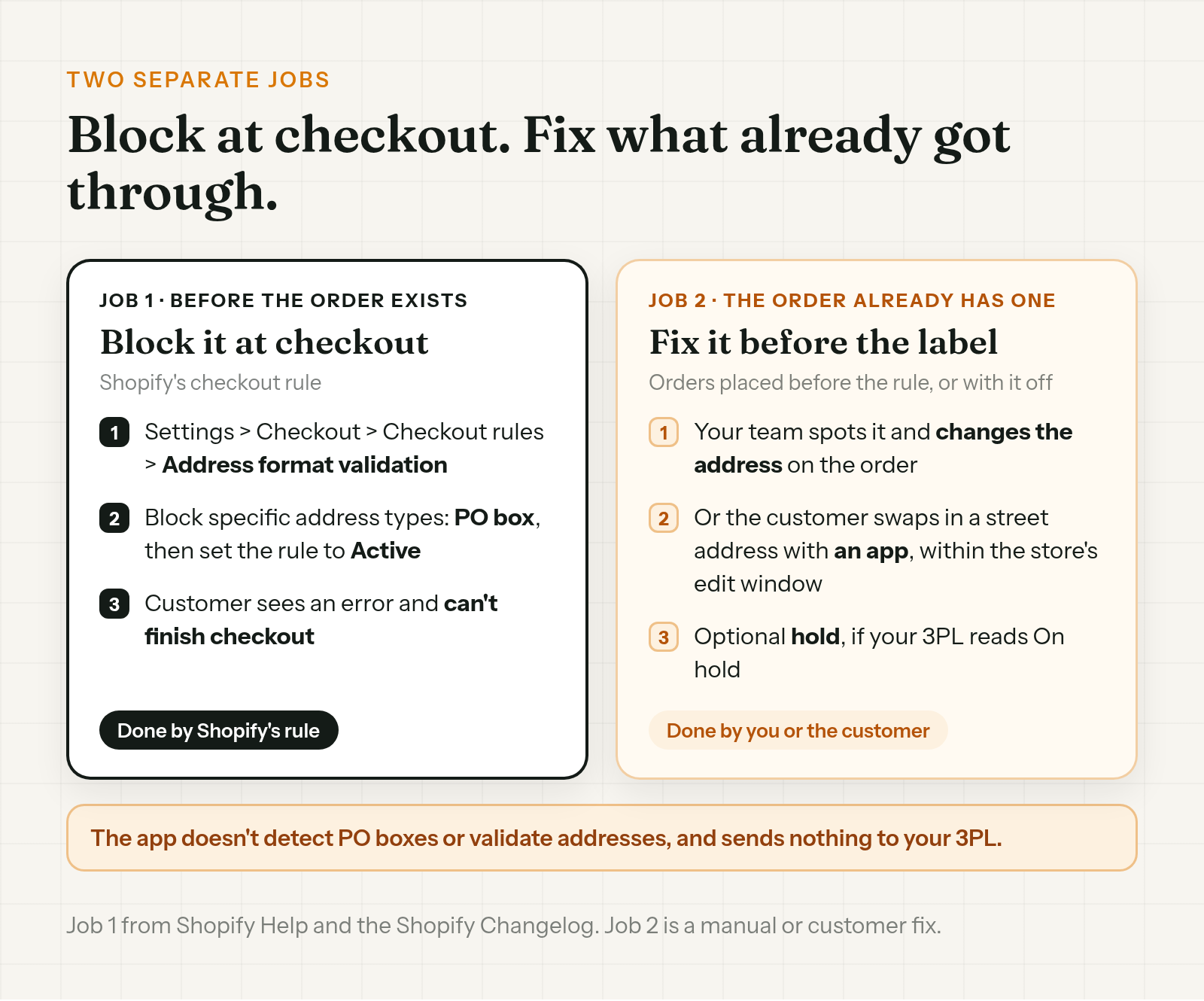
Catch it before the label. Read the ship-to address on new orders for PO Box, P.O. Box or Post Office Box. When you find one, ask for a street address:
Hi Dana, thanks for order #1131. Our carrier can't deliver to PO boxes, so we need a street address to ship it. Could you reply with one? We'll update the order before it ships.
Then change the address on the order while it's unfulfilled. The full steps, including what to do if a label already exists or your 3PL has the order, are in how to change a shipping address on Shopify after an order.
If you need time for the customer to reply, a fulfillment hold keeps new orders off the pick list, if your 3PL reads Shopify's On hold status. Setup is in how to hold fulfillment on Shopify during order edits.
Order Change lets the customer swap in a street address themselves within the store's edit window, before anything ships. They can do it on the Thank You page right after checkout, with no login, or from the Order Status page if your store uses new customer accounts, while the store's edit window is still open. The optional fulfillment hold keeps the order from shipping until that window closes. It doesn't make the window any longer. The hold is off by default and only works if your 3PL reads On hold.
It won't spot a PO box, so the customer has to notice. Blocking is Shopify's checkout rule, and spotting one that got through is up to your team or the customer. It sends nothing to your 3PL, so a warehouse that already pulled the order may still have the old address. More at orderchange.com.
If it already shipped to a PO box
Once it's with the carrier, changing the order changes your records, not the parcel. On UPS, the parcel could be delayed, isn't covered by any UPS Service Guarantee and needs an address correction charge. Ask the carrier what it can do, and promise the customer nothing until it answers. The carrier side is covered in the address change guide above.
Check these either way
- Billing addresses. The rule doesn't check them. A PO box in billing isn't a shipping problem on its own.
- Your error message. Say what to enter instead, like Shopify's "Enter a street address (no PO boxes)."
- Custom regex. Test a street with "Box" in its name after every change.
- The old Address Blocker. It shut down on 31 Aug 2026. Check the migrated settings under Checkout rules.
FAQ
Can I block PO boxes on Shopify without an app?
Yes. Shopify's changelog says the checkout rule is available to all merchants. Go to Settings > Checkout > Checkout rules > Address format validation, pick PO box under Block specific address types, and set the rule to Active. Customers then see an error and can't finish checkout until they change the address.
Does UPS deliver to PO boxes?
No. UPS says it only ships to a valid street address and doesn't deliver to P.O. boxes. The exception is UPS Ground Saver, a contract service that can deliver to US PO boxes with final delivery by USPS.
Does the PO box rule check billing addresses?
No. Shopify validates shipping addresses only. Billing addresses aren't checked.
What happened to the Checkout Blocks Address Blocker?
Shopify deprecated it and shut it down on 31 Aug 2026. Compatible settings were migrated automatically to address format validation. Check your rule under Settings > Checkout > Checkout rules.
A customer entered a PO box on a Shopify order. What now?
If it hasn't shipped, ask the customer for a street address and change the address on the order before the label is bought. If it already shipped, it's a question for the carrier.
Can the rule block real addresses by mistake?
It can. Shopify warns that an overly strict custom regex can block valid addresses. Test a few real addresses, including a street with "Box" in its name, before you rely on it.
To block PO boxes on Shopify, pick the PO box address type in Shopify's address format validation rule and set the rule to Active. Then test it. That stops new ones at checkout. For orders that already have a PO box, ask for a street address and change it before the label is bought.
For stores that want customers to fix their own shipping address within the store's edit window, see orderchange.com.
Related: change a shipping address
For the full edit, label void and 3PL steps, see How to change a shipping address on Shopify after an order.
Related: missing apartment number
For a blank address line 2 and fixing it before the label prints, see Missing apartment number on a Shopify order.
Related: hold fulfillment
To keep orders out of the warehouse while customers can still fix them, see Hold fulfillment on Shopify during order edits.