How to Cancel a Duplicate Shopify Order (and Keep the Right One)
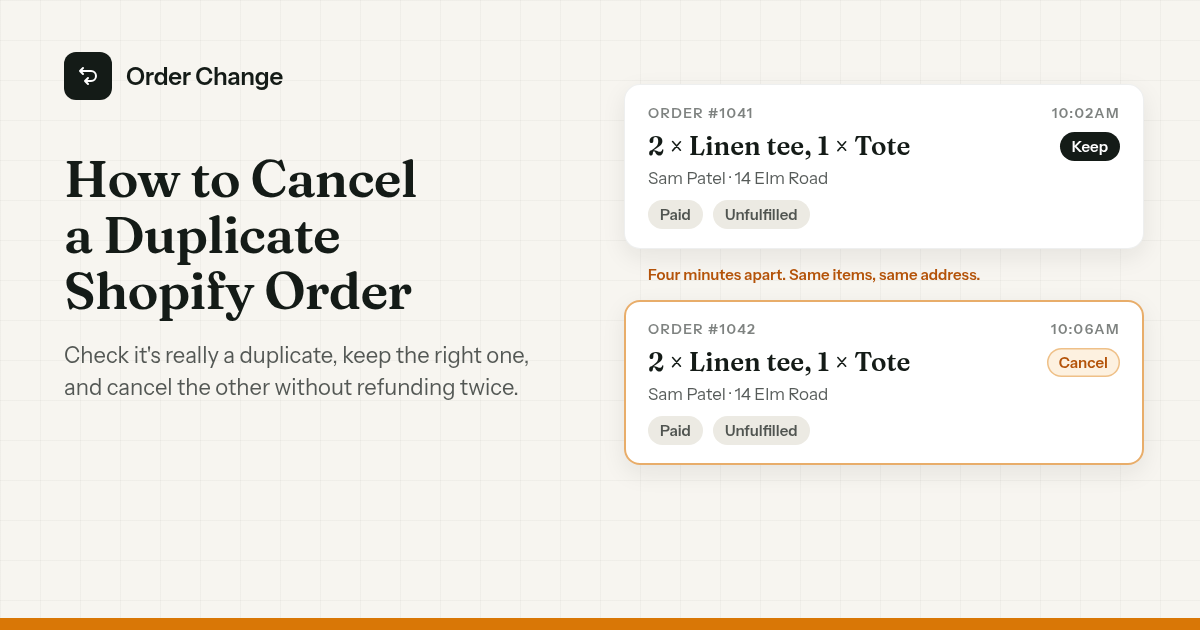
10:02am. Order #1041. Two linen tees and a tote bag.
10:06am. Order #1042. Same tees, same tote, same address.
10:31am. An email: "I think I got charged twice?"
It looks like a two-minute job. But a cancel in Shopify can't be undone, and neither can a refund. Cancel the wrong order, or refund the same one twice, and there's no button that puts it back.
The short version. Check it's really a duplicate before you touch anything. Decide which order stays. Cancel the other one on its own, not in bulk, with the refund going to the original payment method, and use the staff note to name the order you kept. Then make sure the extra order isn't already with your warehouse.
Is it really a duplicate?
Two matching orders look like a mistake. Sometimes they aren't. A customer might buy one for themselves and one for a friend.
Signs the customer accidentally ordered twice:
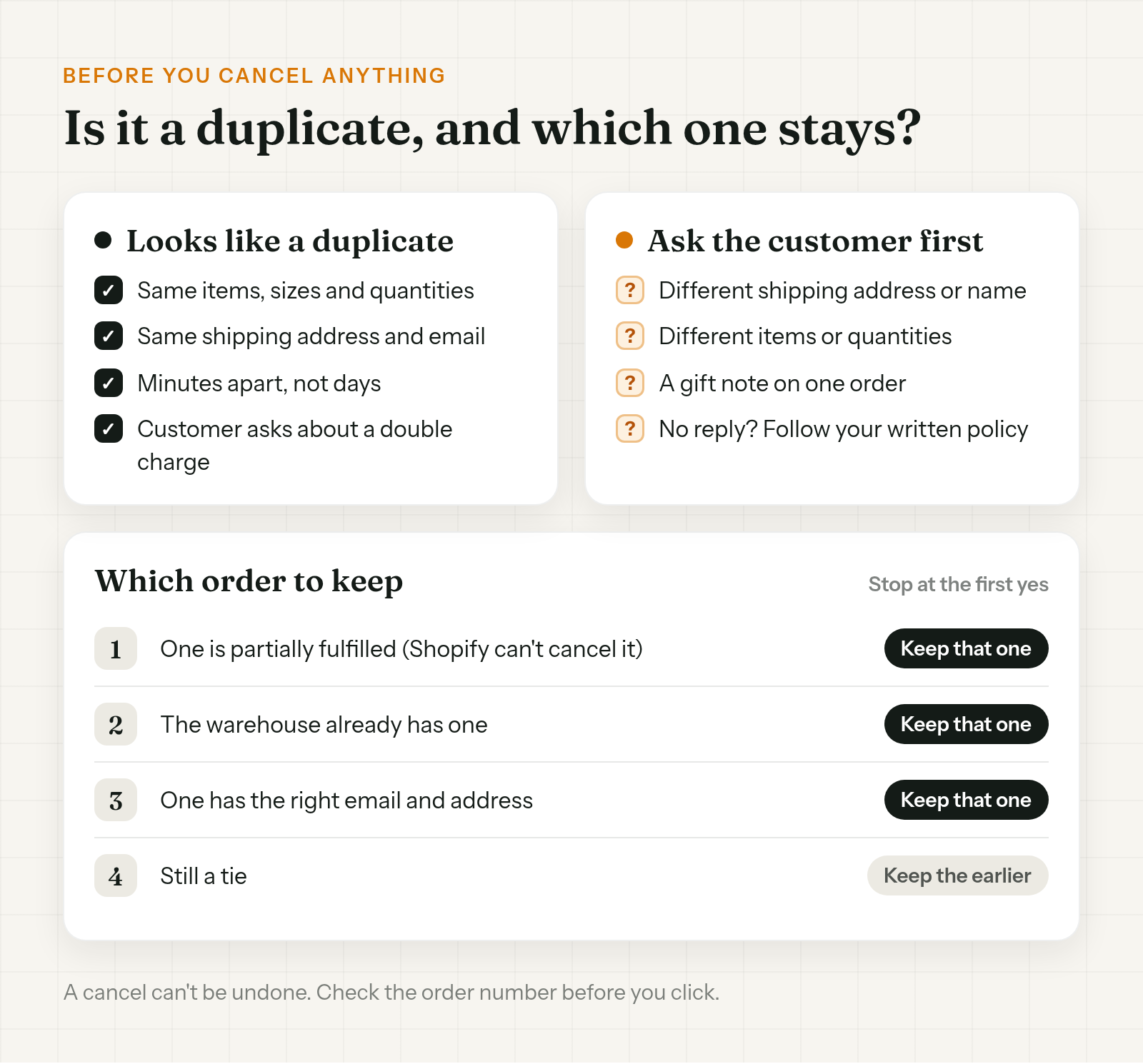
- Same items, sizes and quantities.
- Same shipping address and the same email.
- Minutes apart, not days.
- The customer has already written in about a double charge.
Stop and ask first if one order has a different shipping address or name, different items, or a gift note.
Real duplicates have ordinary causes. The confirmation email never arrived, so the customer ordered again. Or the payment page hung, they hit back, and paid a second time.
When you're not sure, ask. One line is enough:
Hi Sam, we can see two orders from you this morning, #1041 and #1042, with the same items. Did you mean to place both? If not, reply and we'll cancel #1042 and refund it in full.
The hard case is the customer who doesn't answer. One merchant on the Shopify Community had two matching orders, tried phone, email and text, got nothing back, and asked how to refund one without taking a loss. That one's a policy call. Decide once how long you wait and what happens if nobody replies, and write it in your help desk.
Which order to keep
Work down this list and stop at the first yes.
- Is one partially fulfilled? Keep that one. Shopify can't cancel a partially fulfilled order.
- Does the warehouse already have one? Keep that one, and cancel the order that's still sitting in Shopify.
- Does one have the right email and address? Keep it. If a typo meant the first confirmation never arrived, the newer order may be the one with the right details.
- Still a tie? Pick one, and put a staff note on both orders saying which stays.
Then check the order number again. Shopify's developer docs say a canceled order can't be restored to its original state, and Shopify Help says you can't reverse a refund once you've started it. If you cancel the wrong one, a Shopify staff member's fix in the Community is to email the customer, send a draft order invoice, and fulfill the new order. That means asking them to pay again.
Cancel the duplicate the right way
Open the order you're canceling, not the one you're keeping.
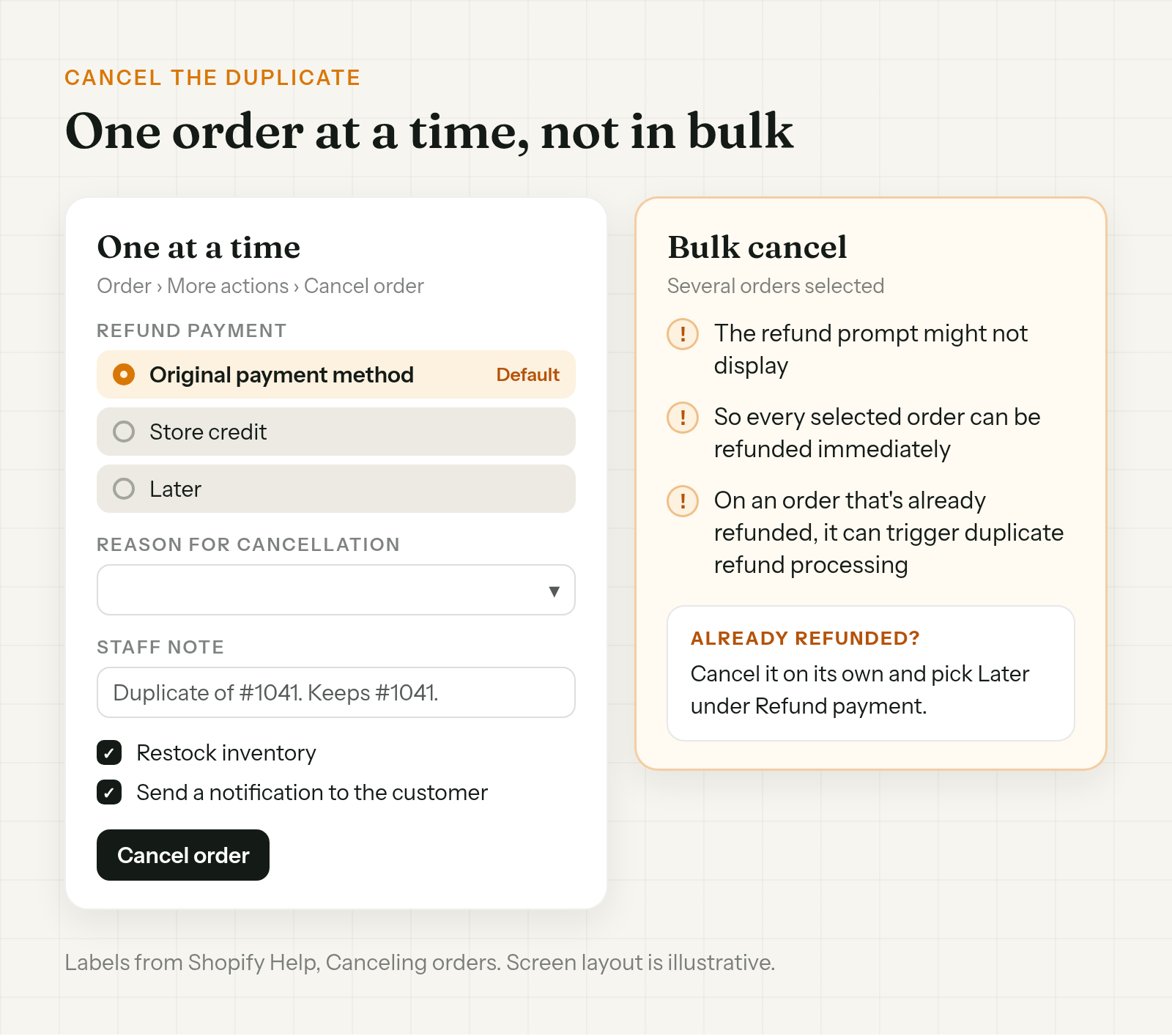
- Go to Orders, open the duplicate, and click More actions > Cancel order.
- Under Refund payment, leave Original payment method selected. It's the default. The other options are Store credit and Later.
- Pick a Reason for cancellation.
- In the Staff note, name the order that stays. Something like "Duplicate of #1041. Customer keeps #1041."
- Leave Restock inventory on, so the stock goes back. It's on by default.
- Leave Send a notification to the customer on, so they know which order went.
- Click Cancel order.
Shopify stores what was refunded and restocked in the order Timeline, so the note and the details sit together.
Three ways this goes wrong:
- Bulk canceling. With several duplicates, it's tempting to select them all and cancel at once. Shopify Help warns that the refund prompt might not display, so every selected order gets refunded immediately. Do them one at a time.
- The duplicate was already refunded. If someone refunded it from the refund screen first, don't bulk cancel it. Shopify says that can trigger duplicate refund processing. Cancel it on its own and pick Later under Refund payment.
- Someone got there first. An order that's already canceled can't be canceled again. If the duplicate won't cancel, check its Timeline before you do anything else.
"I was charged twice": what the customer is seeing
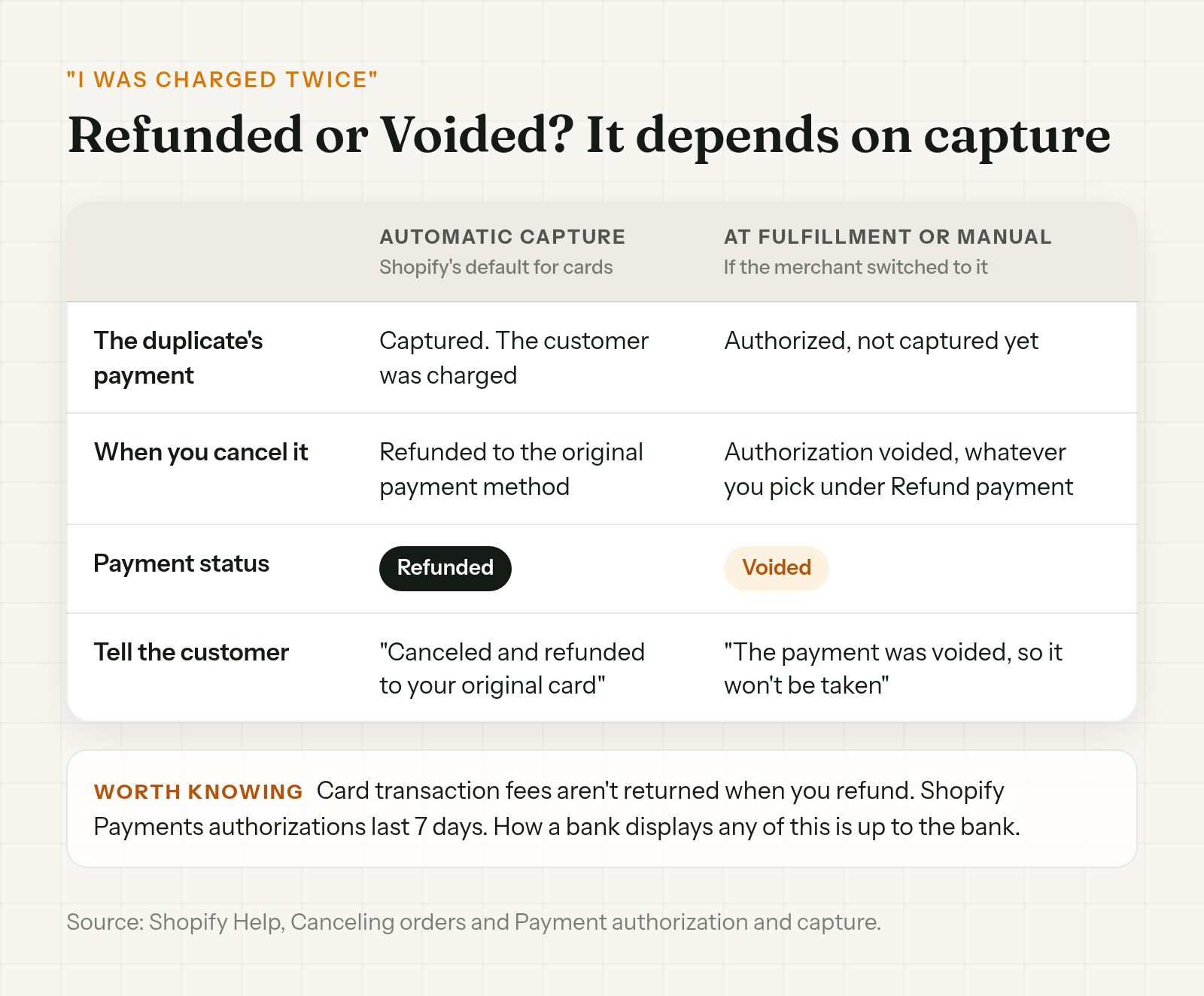
What "charged twice" means depends on how your store captures card payments. Shopify captures them automatically by default. Merchants can switch to capturing at fulfillment, or manually.
- Automatic capture. Both orders were charged. Canceling the duplicate with Original payment method refunds it, and its payment status changes to Refunded.
- Capture at fulfillment, or manual. The duplicate's payment was authorized but not captured. Canceling it voids the authorization, whatever you pick under Refund payment, and the payment status changes to Voided. With Shopify Payments, an authorization lasts 7 days.
So it can be two real charges, or one charge plus an authorization that gets voided when you cancel.
When you reply, say what you did: "We've canceled #1042 and refunded it to your original card," or "the payment on #1042 was voided, so it won't be taken." Don't promise what their statement will show. That's down to their bank.
As for what a duplicate order refund costs you, Shopify Help is plain: "Credit card transaction fees aren't returned to you when you issue a refund."
If the warehouse already has one
If your 3PL or fulfillment app already pulled the duplicate, canceling in Shopify might not stop it. Shopify Help says that with a third-party fulfillment service, "you might need to cancel the order through that service's system before canceling in Shopify."
So contact the warehouse first. Give them the order number to stop and the one to keep. When they confirm, cancel the duplicate in Shopify as above.
If the warehouse can't stop it, or it's already in the post, see what to do when a Shopify order is canceled but still shipped.
Stop the next one
- Make sure confirmations arrive. A typo in the email means the confirmation never lands, and some customers order again to be sure. Fixing a wrong email on an open order is covered in how to change the email on a Shopify order.
- Let the customer cancel the extra one. The first person to spot a duplicate is the customer looking at two confirmations. Shopify's own cancellation requests still wait for your team. The setup and limits are in how to let customers cancel their own Shopify orders.
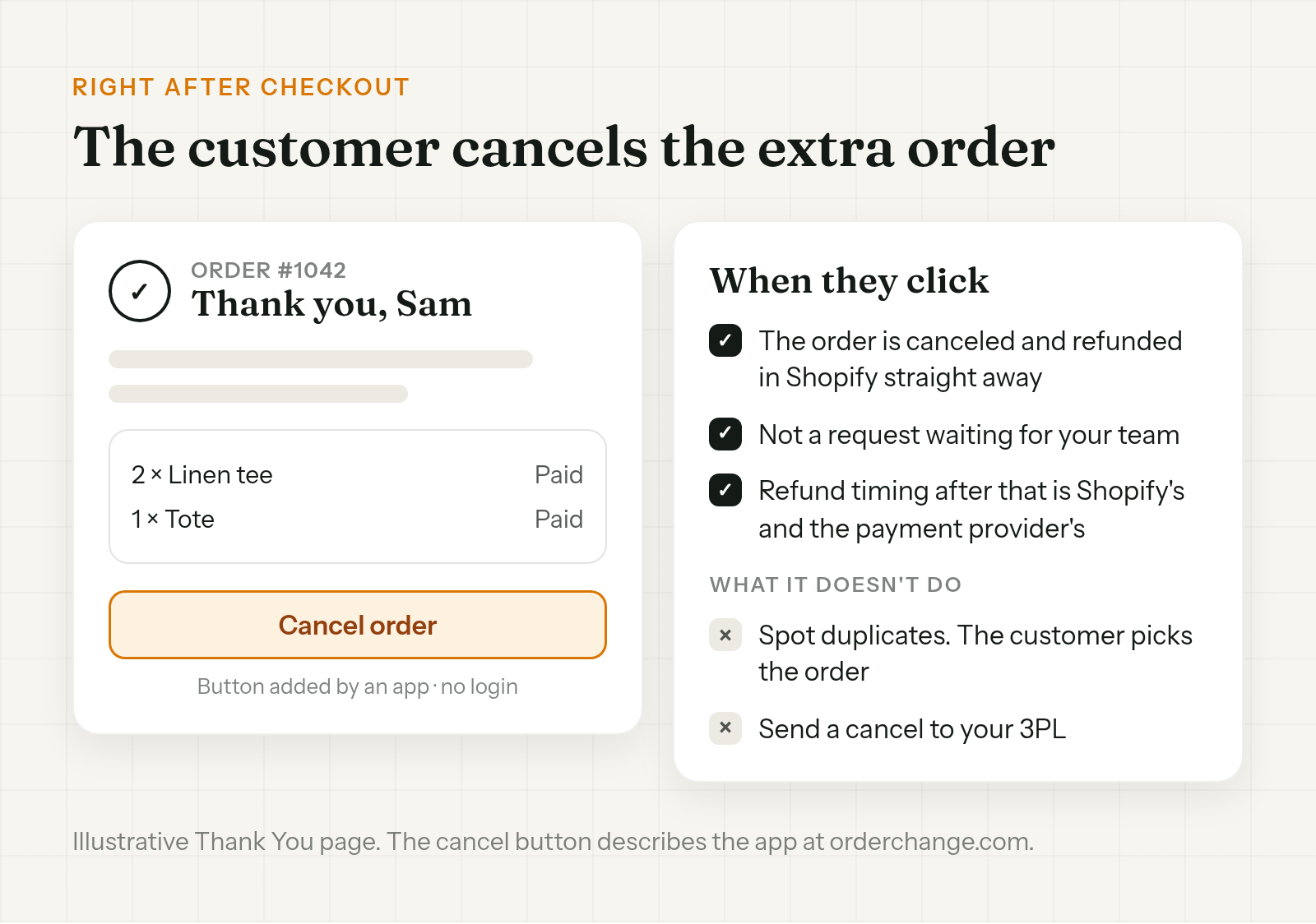
Order Change lets a customer who sees two confirmations cancel the extra order themselves, on the Thank You page, right after checkout. No login needed. The cancel is immediate: the order is canceled and refunded in Shopify, not sent to your team as a request. When the refund lands is up to Shopify and the payment provider. Customers can also cancel from the Order Status page if your store uses new customer accounts.
It doesn't spot duplicates. The customer decides which order to cancel. It doesn't send a cancel to your 3PL either, though warehouses that sync with Shopify may react to the canceled order. There's an optional fulfillment hold, off by default, that only works if your 3PL reads On hold. More at orderchange.com.
Check these either way
- Partially fulfilled orders. Shopify can't cancel them. Keep that one.
- Store credit. It's on the cancel screen, but a customer who paid twice by mistake wants their money back. Pick Original payment method.
- The order you kept. Check its email and shipping address before it ships. If a typo caused the duplicate, the same typo might be on the order that stays.
FAQ
My customer ordered twice. How do I cancel one?
Confirm it's a real duplicate and decide which order stays. Open the other one, click More actions > Cancel order, keep Original payment method, and add a staff note naming the order you kept.
Will the customer be charged twice?
It depends on how you capture payments. With automatic capture, both orders were charged, and canceling the duplicate refunds it. If you capture at fulfillment or manually, the duplicate was only authorized, and canceling voids the authorization.
Do I get the card fees back when I refund a duplicate order?
No. Shopify Help says credit card transaction fees aren't returned to you when you issue a refund.
Can I undo a cancel if I picked the wrong order?
No. A canceled order can't be restored, and a refund can't be reversed. Email the customer, send a draft order invoice for the order they wanted, and fulfill that.
Can I bulk cancel duplicate orders?
It's safer not to. Shopify Help warns the refund prompt might not display, so every selected order gets refunded immediately. On an already refunded order, it can trigger duplicate refund processing. Cancel each one on its own.
What if the duplicate already shipped?
Then canceling in Shopify won't bring it back. Ask your 3PL where it is, then treat it like any canceled order that still shipped: a return or a write-off.
To cancel a duplicate Shopify order cleanly, confirm it's a duplicate, pick the order that stays, and cancel the other one on its own, refunded to the original payment method, with a staff note naming the order you kept. Check the warehouse hasn't got it. Neither a cancel nor a refund can be undone, so check the order number before you click.
For stores that want customers to cancel the extra order themselves, see orderchange.com.
Related: let customers cancel
To set up self-serve cancellation, see How to let customers cancel their own Shopify orders.
Related: canceled but still shipped
When the cancel arrives after the warehouse has the order, see Shopify order canceled but still shipped.
Related: change the email on an order
When a typo means the confirmation never arrived, see How to change the email on a Shopify order.