How to Let Customers Cancel Their Own Shopify Orders
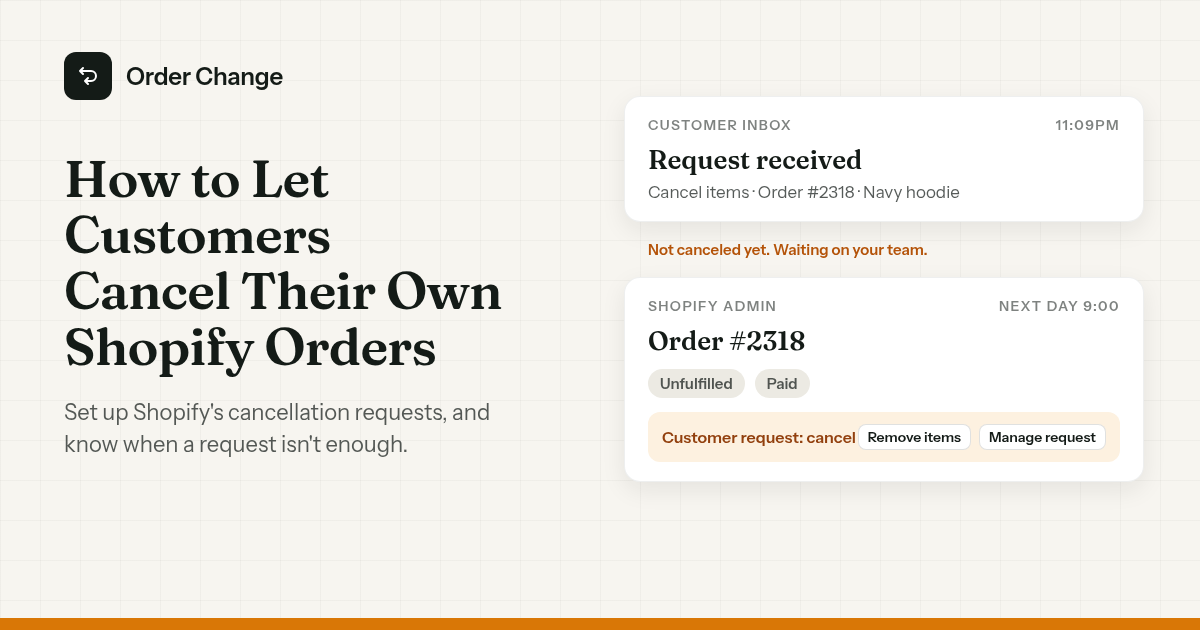
11:04pm. A customer orders a navy hoodie.
11:09pm. She realises she wanted black and emails: "Please cancel, I'll reorder."
Nobody reads it until 9am. The warehouse pulled the order at 6.
So you turn on Shopify's self-serve cancellations. Next time she clicks Cancel items herself, gets a confirmation email, and goes to bed thinking it's done.
It isn't. The order is sitting in your admin with a banner on it, waiting for someone on your team.
The short version. Shopify lets customers request a cancellation from their account, for items that haven't shipped, if your store uses new customer accounts. A request doesn't cancel anything. Someone on your team still refunds or declines each one. Set it up with a window that fits your warehouse, and check requests often. If you want to let customers cancel an order on Shopify and have it happen the moment they click, that takes an app.
Set up Shopify's self-serve cancellation requests
Two settings, in two places.
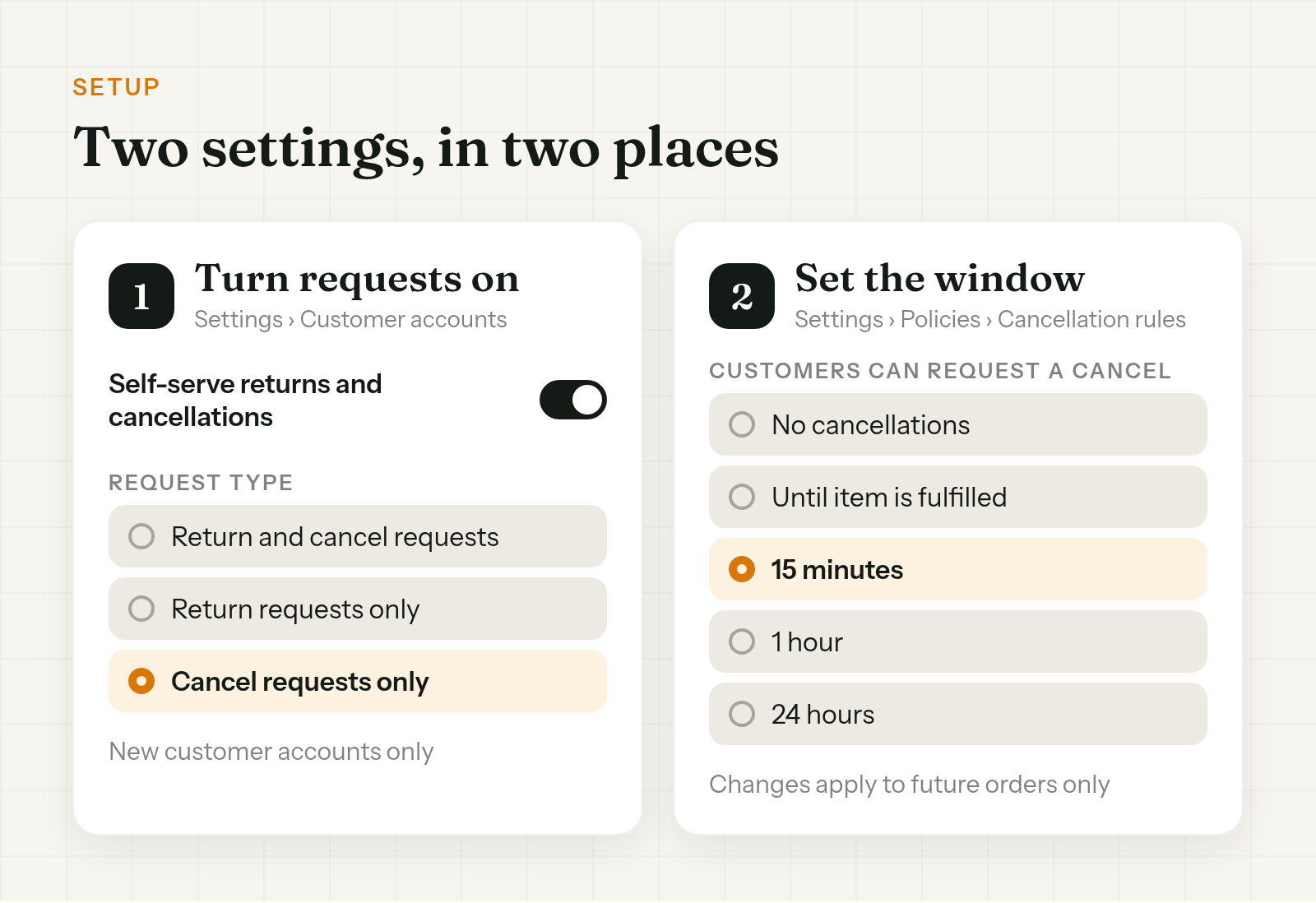
- Turn requests on. Go to Settings > Customer accounts and turn on Self-serve returns and cancellations. Pick a request type: Return and cancel requests, Return requests only, or Cancel requests only.
- Set the window. Go to Settings > Policies > Return and cancellation rules. Under Cancellation rules, turn on cancellation requests and pick a window: No cancellations, Until item is fulfilled, 15 minutes, 1 hour or 24 hours.
A few things that trip people up:
- Legacy accounts are out. Shopify Help says it plainly: "Self-serve returns and cancellations don't work with legacy customer accounts." You can keep legacy accounts on the storefront and link the new customer accounts page from your footer or refund policy, but customers still sign in there to ask.
- Rule changes only apply to future orders. Orders placed before the change keep the old rules.
- Final sale is your exclusion list. Products or collections marked final sale can't be canceled or returned. Personalised and digital items aren't exempt by default, so mark them.
- It covers every order type, B2B included. You can't limit it to some orders.
What the customer sees
From the customer's side, a Shopify self-serve order cancellation looks like this:
- They sign in with their email and a six-digit code. No password.
- On the order status page they click Cancel items. Depending on what's eligible, the button may say Return items or Cancel or return instead.
- Only items that haven't shipped can be canceled. On a split order, they can request a cancel for the unshipped items and a return for the shipped ones.
- They get a confirmation email right after submitting, before anyone on your team has looked.
That last step is where expectations drift. At 11pm, a confirmation email can read like "it's canceled". Say it's a request in your FAQ and help pages, and say how fast your team usually responds.
Customers who checked out as guests still have to sign in with that code to ask. Some won't bother, and you'll get the email anyway.
A cancellation request isn't a cancel
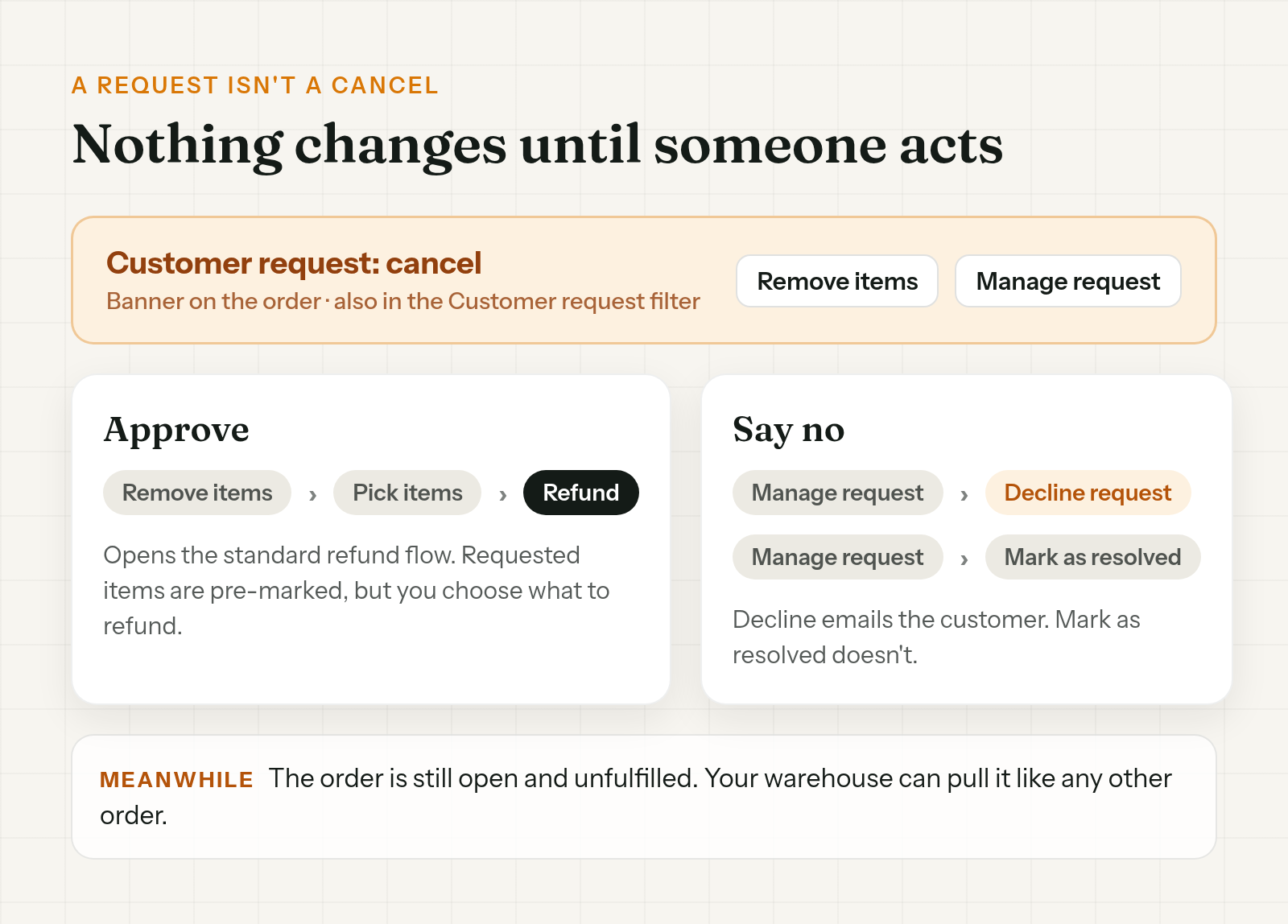
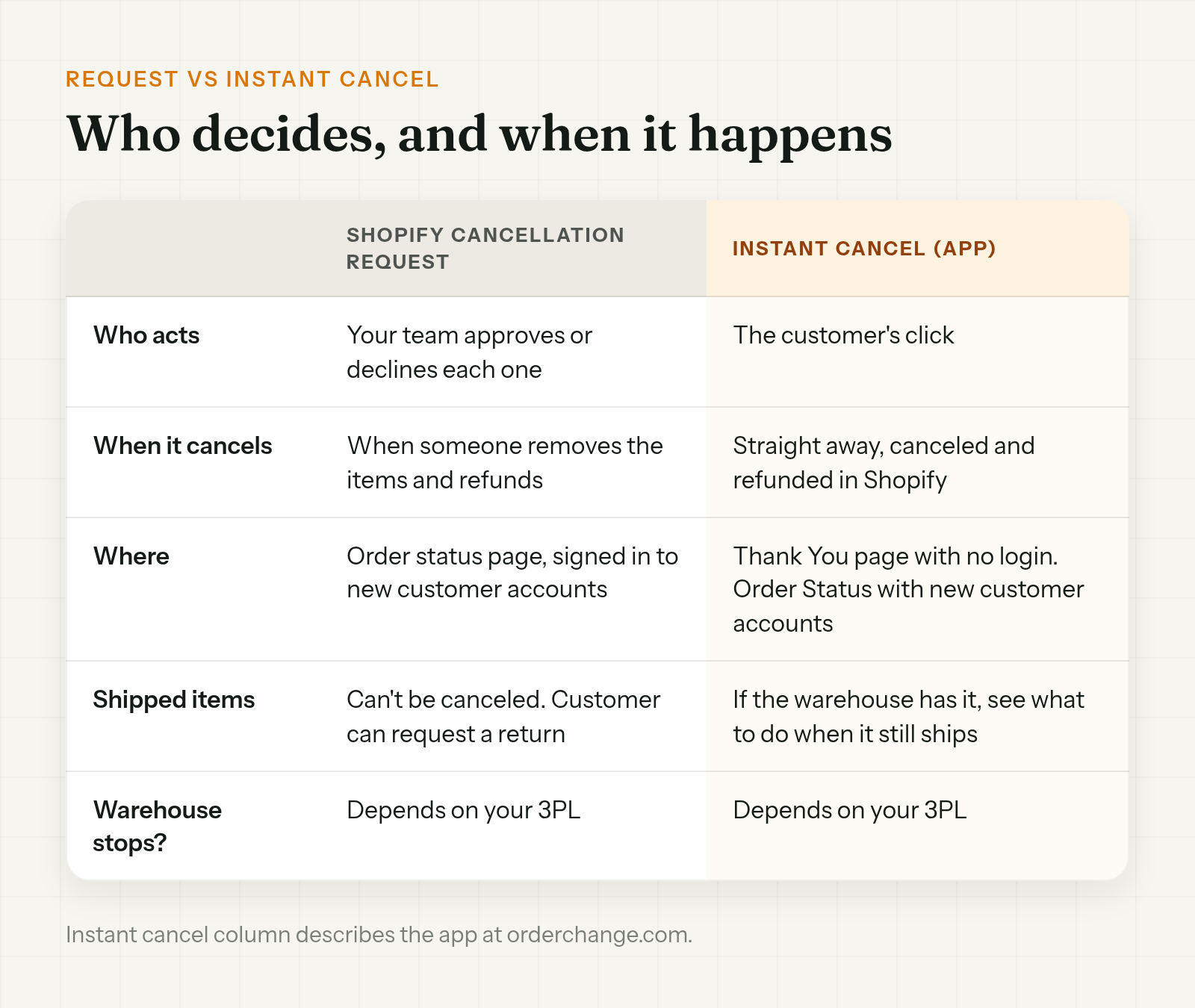
This is the part that's easy to miss. Shopify Help: "A cancellation request doesn't change the order's state on its own. You review and decide on every request."
A Shopify customer cancellation request reaches you in three places:
- You get an email for each request.
- The Customer request filter on the Orders page lists them.
- The order itself shows a banner with Remove items and Manage request.
To approve it, click Remove items. That opens the standard refund flow. The requested items are pre-marked, but you still choose what to refund, then click Refund.
To say no, open Manage request. Decline request emails the customer. Mark as resolved closes it without an email.
Two edge cases from Shopify Help:
- If you remove the items but refund later, the request stays on the order as a reminder.
- On an unpaid order, Remove items restocks the items instead, and canceling the whole order also resolves the request.
Meanwhile the order is still an ordinary open order. Nothing about the request reaches your warehouse until someone acts on it. If your 3PL pulls new orders every 15 minutes, a request that sits overnight is one the warehouse never hears about.
Pick a window your warehouse can live with
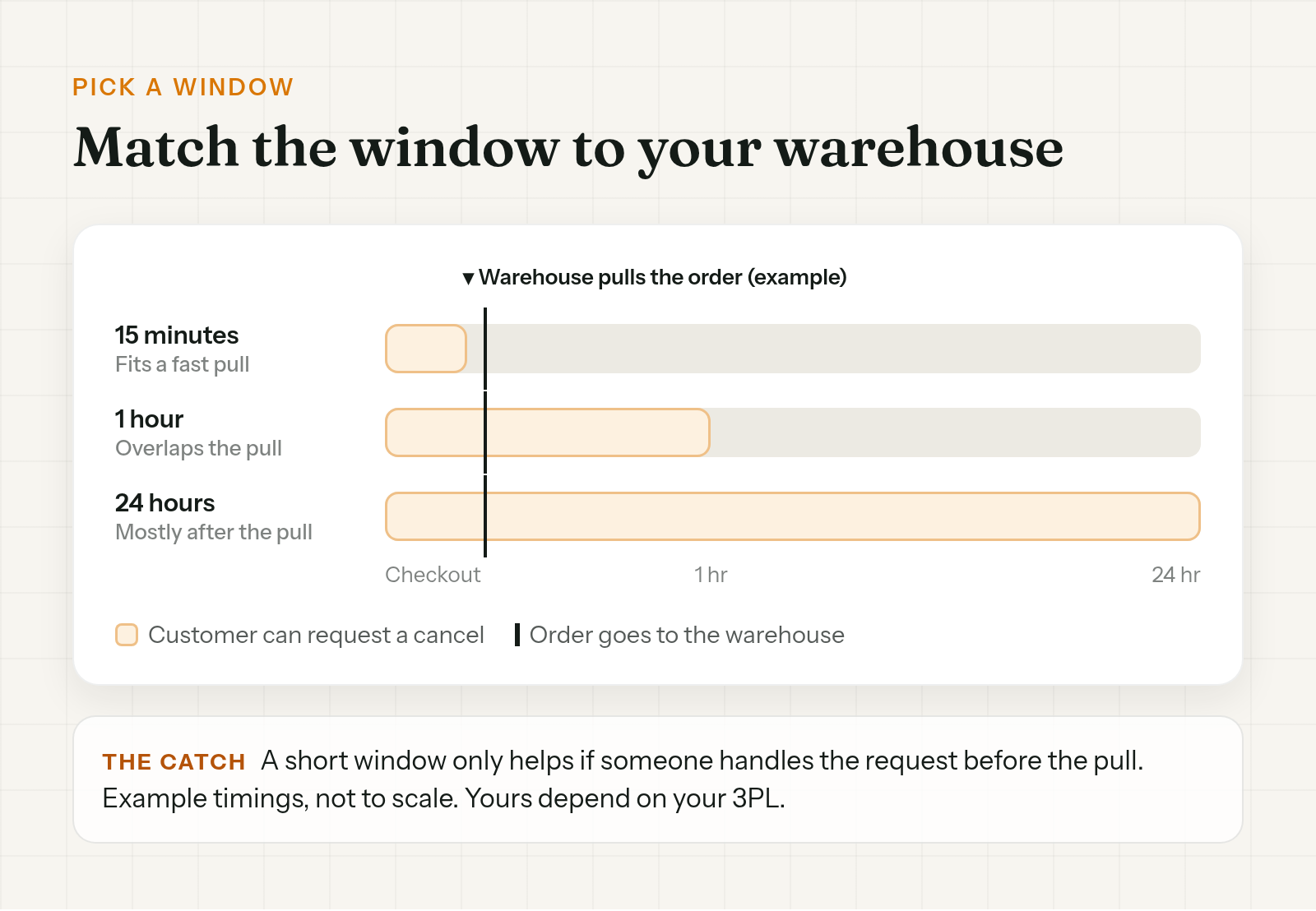
The window decides how long customers can ask. Your warehouse decides how long you actually have.
Find out how soon your 3PL or shipping app pulls new orders from Shopify. Then pick a window that closes before that, or close to it.
- 24 hours with a warehouse that pulls orders in 15 minutes means a lot of requests will arrive after the order is already on a pick list.
- Until item is fulfilled sounds safe, but an item can stay unfulfilled in Shopify until it ships. A customer can still ask while it's being packed.
- 15 minutes or 1 hour lines up better with a fast warehouse, as long as someone can act on requests that quickly.
That last condition is the catch. A 15-minute window at 11pm with nobody on shift doesn't help the customer. They can ask, but no one processes it until the morning.
A hold helps here. Hold new orders for a short window so they aren't released before anyone sees the request. That only works if your 3PL reads Shopify's On hold status. The setup is in how to hold fulfillment on Shopify during order edits. Watch one thing: if the hold releases before anyone has handled the request, the warehouse still gets an order the customer asked to cancel.
When a request isn't enough
A request that waits for your team is fine during working hours on a normal day. It struggles when:
- Orders come in overnight or at the weekend, and requests pile up until Monday.
- Customers checked out as guests and won't sign in with a code.
- It's a launch or a sale day and the team is buried.
In those cases you want the cancel to happen when the customer clicks, not when someone gets to it.
Order Change lets customers cancel the order themselves, and the cancel is immediate. The order is canceled and refunded in Shopify, with no request waiting for approval. Customers can do it on the Thank You page without signing in, whatever account type your store uses, and on the Order Status page if you use new customer accounts. When the refund lands is up to Shopify and the payment provider. There's also an optional fulfillment hold, off by default, that keeps new orders out of the warehouse while customers can still cancel, if your 3PL reads On hold.
It doesn't send a cancel to your 3PL. Warehouses that sync with Shopify may react to the canceled order on their side. If the warehouse already has it, see what to do when a Shopify order is canceled but still shipped. More at orderchange.com.
Check these either way
- Subscriptions. Shopify notes that processing a cancellation request on a subscription order doesn't cancel the subscription contract. Check the subscription app too.
- Personalised and digital items. They aren't exempt by default. Mark them final sale if they shouldn't be canceled.
- Shipped items. They can't be canceled. They're a return.
- Card fees. Shopify Help notes that card transaction fees aren't returned when you refund.
FAQ
Can customers cancel their own Shopify order?
They can request a cancellation. Shopify lets customers ask to cancel items that haven't shipped from their account, if your store uses new customer accounts. Your team still approves or declines each request.
Does a cancellation request cancel the order?
No. Shopify says a cancellation request doesn't change the order's state on its own. You remove the items and refund, or decline the request.
How do I approve a cancellation request in Shopify?
Open the order, click Remove items on the request banner, choose the items to refund, then click Refund. The Customer request filter on the Orders page lists every open request.
Can customers cancel from the Shopify order status page?
With Shopify's own feature, they can request a cancel there after signing in to new customer accounts. An app can add an instant cancel on the Order Status page with new customer accounts, and on the Thank You page without signing in.
Can I limit how long customers have to cancel?
Yes, for Shopify's cancellation requests. Under Cancellation rules, pick No cancellations, Until item is fulfilled, 15 minutes, 1 hour or 24 hours. Changes apply to future orders only.
Does canceling in Shopify stop my 3PL?
Not necessarily. Once a fulfillment service has accepted an order, a cancel becomes a cancellation request it can reject, and a picked or labeled order can still ship.
To let customers cancel an order on Shopify, turn on self-serve cancellation requests under Customer accounts, set a window under Cancellation rules, and handle each request from the banner on the order. Pick a window your warehouse can beat, and remember a request only becomes a cancel when someone on your team clicks Refund.
For stores that want the cancel to happen on the customer's click, see orderchange.com.
Related: canceled but still shipped
When a cancel arrives after the warehouse has the order, see Shopify order canceled but still shipped.
Related: hold fulfillment
To keep orders out of the warehouse while customers can still cancel, see Hold fulfillment on Shopify during order edits.
Related: cancel one item
When the customer wants to keep the order and drop one item, see Cancel a line item on Shopify without voiding the order.