Missing Apartment Number on a Shopify Order? Fix Line 2 Before the Label Prints
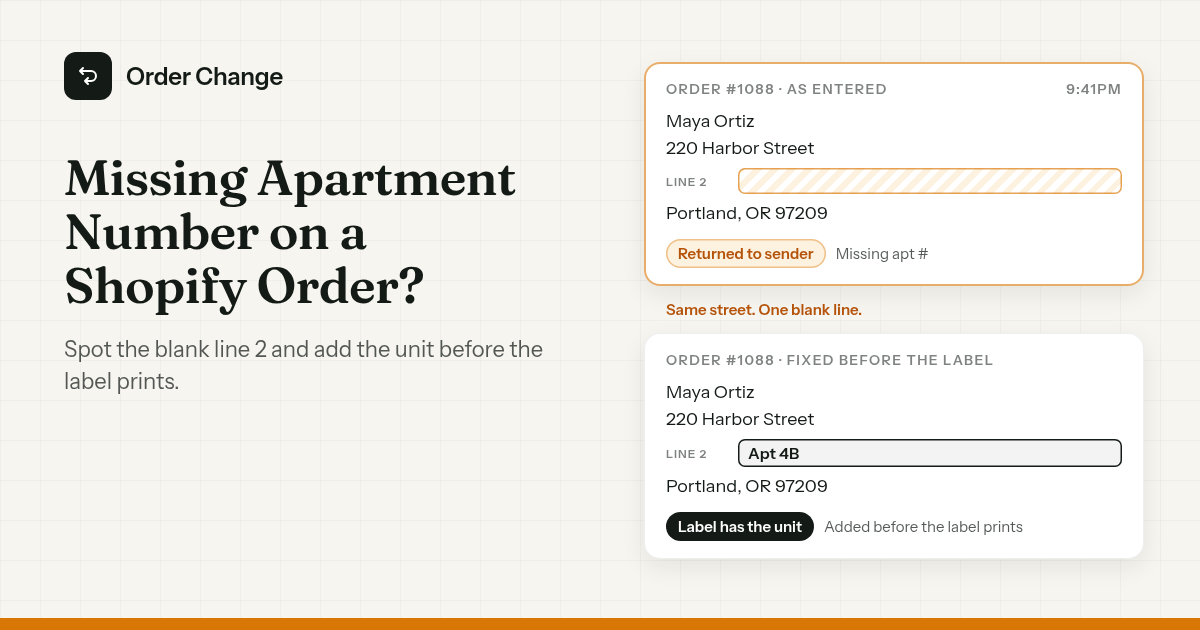
9:41pm. Order #1088. A desk lamp, shipping to 220 Harbor Street.
The customer lives in Apt 4B. She started typing, autocomplete filled in the street, and she clicked Pay. Address line 2 sat there empty, marked optional.
9:42pm. The confirmation email shows the gap in the Ship to block. Nobody reads it.
8:15am. The label prints. A week later the parcel is back on your doorstep, marked unable to deliver, missing apt #.
The short version. If the order hasn't shipped, add the unit number to Address line 2 on the order before anyone buys the label. If a label already exists, it won't update itself. If the parcel is already moving, it's a carrier and policy problem, so decide your reship rule now. Then close the gap twice: at checkout, and right after it, when the customer can still spot it.
How a unit number goes missing
The street is right. Line 2 is blank. A customer who left the unit off at Shopify checkout didn't mistype anything. They skipped a field.
A few ways it happens:
- Autocomplete fills line 1. Shopify's address autocompletion is on by default, with suggestions from services like Google Autocomplete. The customer picks the street and moves on. When a customer forgot the apartment number, autocomplete can be the reason.
- Line 2 is optional. That's a setting, and it's yours. More on it below.
- A saved address from before they moved.
- Nobody reads the Ship to block. The confirmation email shows the gap. The customer is looking at the total.
An incomplete shipping address in Shopify looks fine at a glance. That's the problem.
Spot it before you buy the label
The cheapest moment to fix a missing unit is before the label exists.
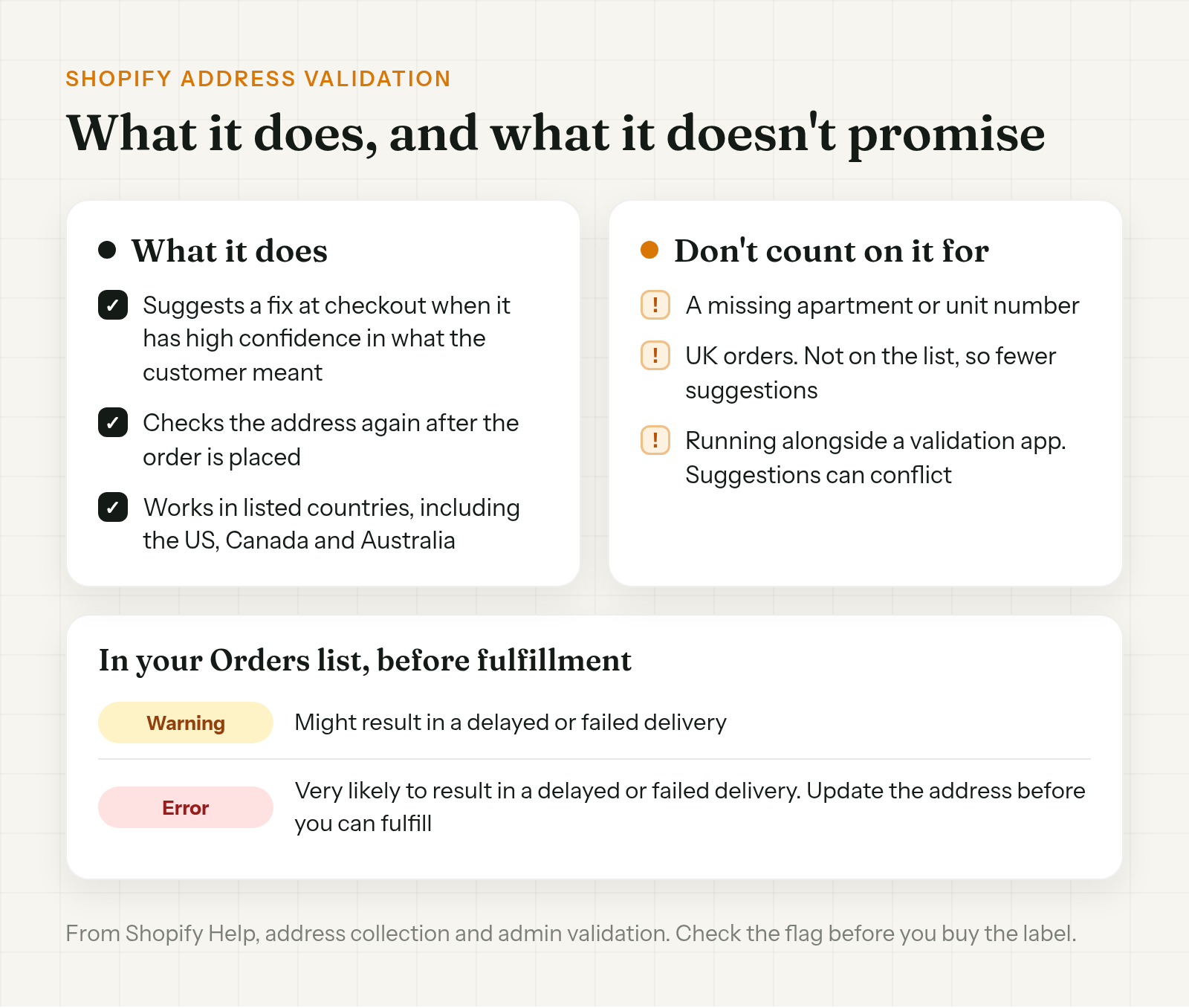
Start with the validation flag. Shopify validates the shipping address after the order is placed and saves the result on each order in your Orders list. Yellow warnings mean the address "might result in a delayed or failed delivery." Red errors mean it's "very likely" to. With a red error, "you need to update the address before you can fulfill the order." You can resolve either "at any time before fulfillment," so don't buy a label over a flag.
Don't count on it for a missing unit number, though. It can flag an address it thinks won't deliver. It doesn't promise to notice that line 2 should say 4B.
Then look at line 2 yourself. If you know the building has flats, or the customer's last order had a unit and this one doesn't, ask.
If you're still unsure, ask. Shopify's own advice is to "contact the customer to confirm their address before fulfillment." One line is enough:
Hi Maya, before we ship order #1088, can you check your address? We have 220 Harbor Street with no apartment or unit number. If there should be one, reply with it and we'll add it before the label prints.
Fix it before it ships
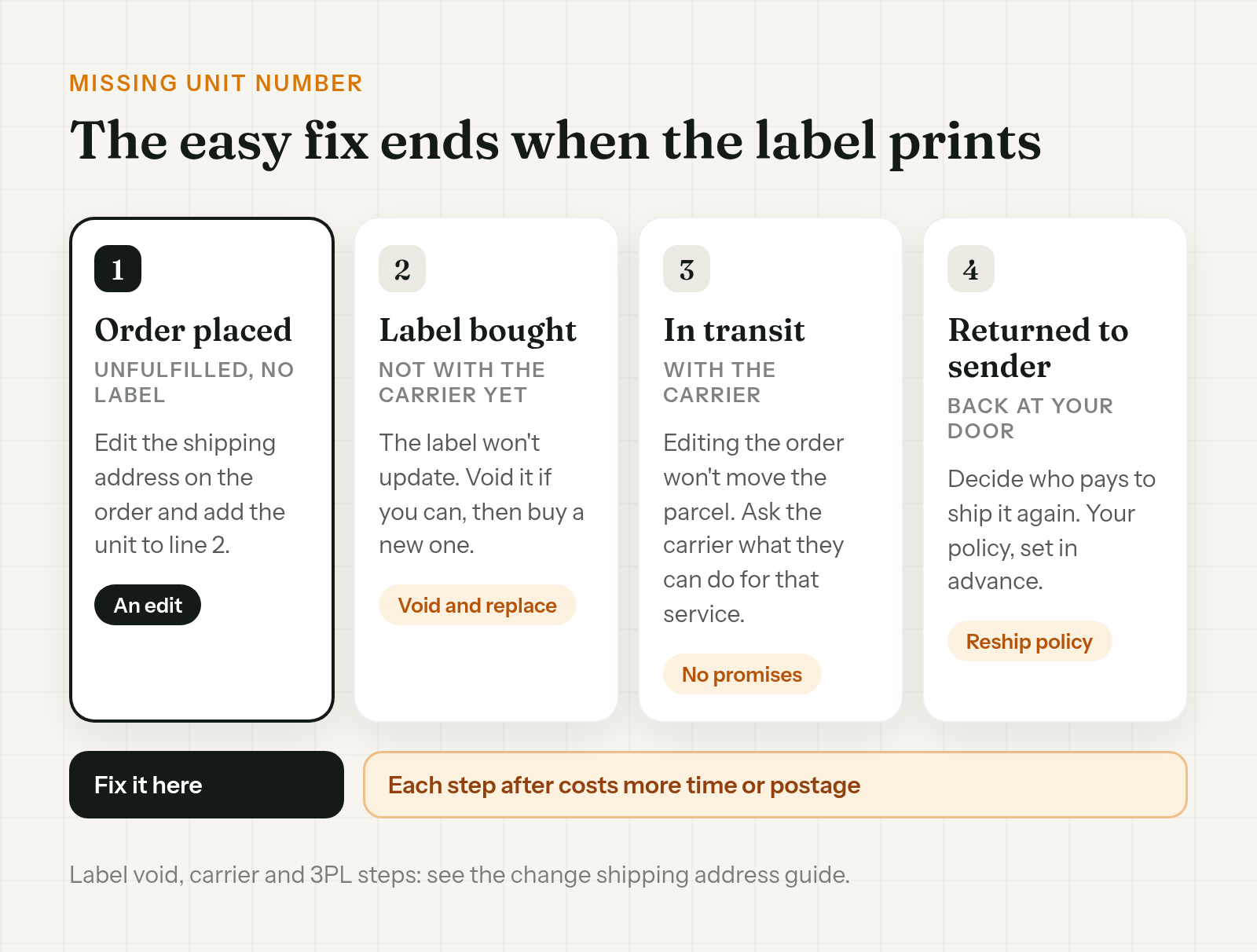
To add a unit number after a Shopify order is placed, edit the shipping address on the order while it's still unfulfilled, put the unit in Address line 2, and save.
Two things can still trip you up:
- A label already exists. It won't update when you change the order. It needs voiding and replacing.
- Your 3PL already pulled the order. Its copy may still have the old address. Check it there before the carton is labeled.
The full sequence, including voiding a label and getting the change to your warehouse, is in how to change a shipping address on Shopify after an order.
If it ships anyway: returned to sender
Once the parcel is with the carrier, editing the order changes your records, not the parcel. What follows is the cost of missing it.
- UPS. If a shipment has an incorrect or incomplete address, UPS says it will make reasonable efforts to get the correct one. UPS charges the shipper an address correction fee for it.
- USPS. Mail that can't be delivered is forwarded, returned to the sender, or treated as dead mail. A return comes back endorsed with a reason, such as Insufficient Address.
If it's still moving, ask the carrier what they can do for that service. Promise the customer nothing until they answer.
Two stories of a Shopify order returned to sender for a wrong address:
- A custom pet art seller on Reddit had a parcel come back about a week after it shipped, marked as missing the apartment number. The customer had been responsive until then and went quiet. With no unit number there's nowhere to reship to, and custom work can't be resold. The top reply: keep the evidence in case of a chargeback.
- On the Shopify Community, a merchant had a parcel come back from USPS marked Addressee Unknown after the customer entered a wrong address. The order had free shipping, so a reship meant paying postage twice.
Who pays to send it again is a policy choice. A Shopify staff answer on that thread gives the options: edit the order, add a custom item for the shipping amount and collect payment. Or refund and have the customer reorder, or send a draft order invoice. Pick one and write it down before the next parcel comes back.
Stop the next one at checkout
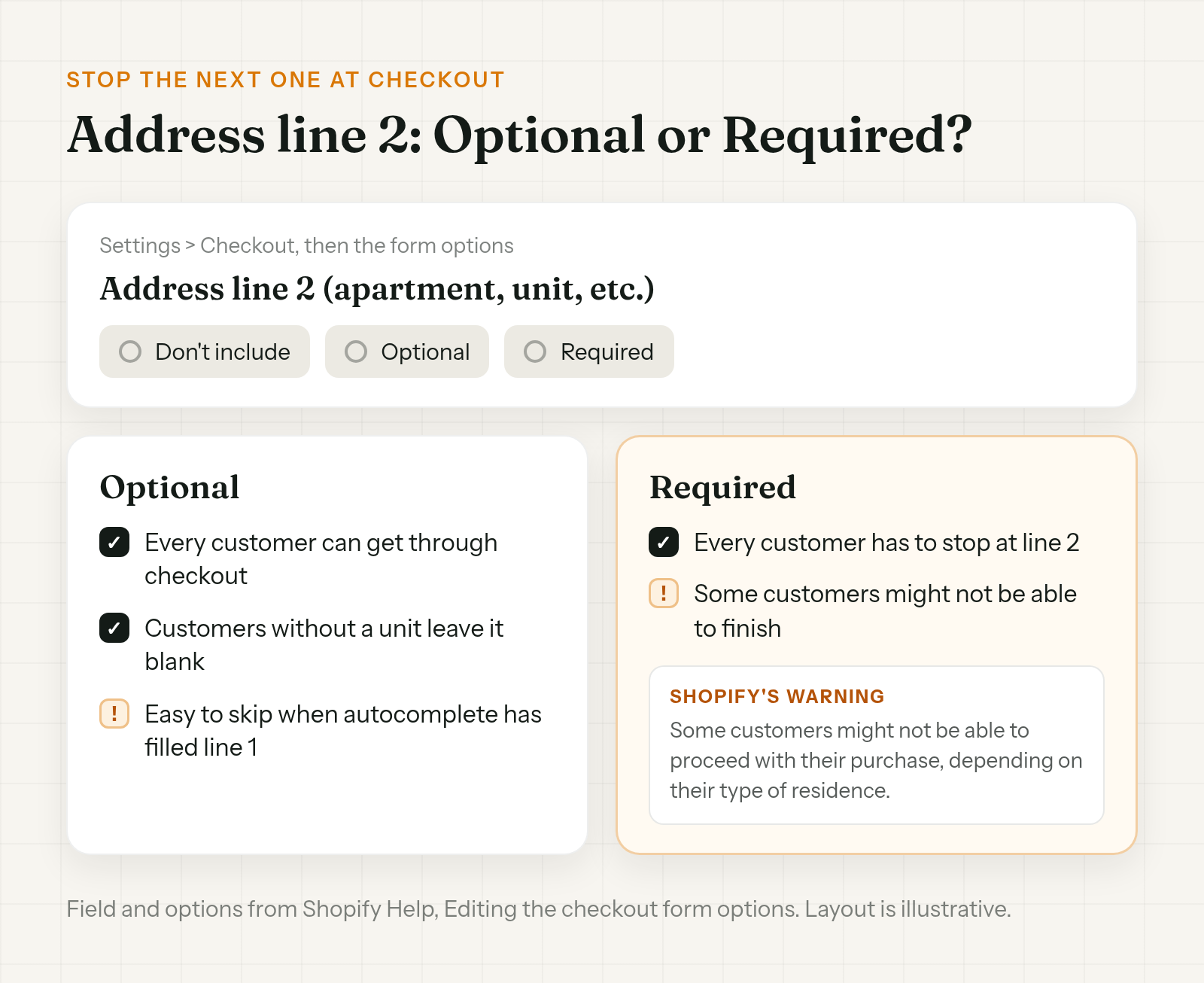
First, decide what to do with line 2. Go to Settings > Checkout, then the form options. The field is "Address line 2 (apartment, unit, etc.)" and you can set it to Don't include, Optional or Required.
Required isn't a free fix. Shopify's own warning: "If this form field option is set to Required, or Don't include, then some customers might not be able to proceed with their purchase, depending on their type of residence."
So it's a trade-off. Optional lets everyone through and leaves line 2 easy to skip. Required makes every customer stop at it, and some may not get past it. Look at where your returned parcels come from before you switch.
Then think about address validation. Go to Settings > Checkout > Advanced preferences > Address collection, check Validate shipping address, and save. Shopify offers suggestions "when there is high confidence in the address details the customer intended." It works in a listed set of countries, including the US, Canada and Australia. The UK isn't on that list.
Use Shopify's validation or a third-party validation app, not both. Shopify Help warns the suggestions can conflict.
Stop the next one after checkout
The customer is the one person who knows their unit number, and the confirmation is where the gap shows. Give them time to see it before the warehouse moves. A short fulfillment hold keeps new orders off the pick list, if your 3PL reads Shopify's On hold status. Setup is in how to hold fulfillment on Shopify during order edits.
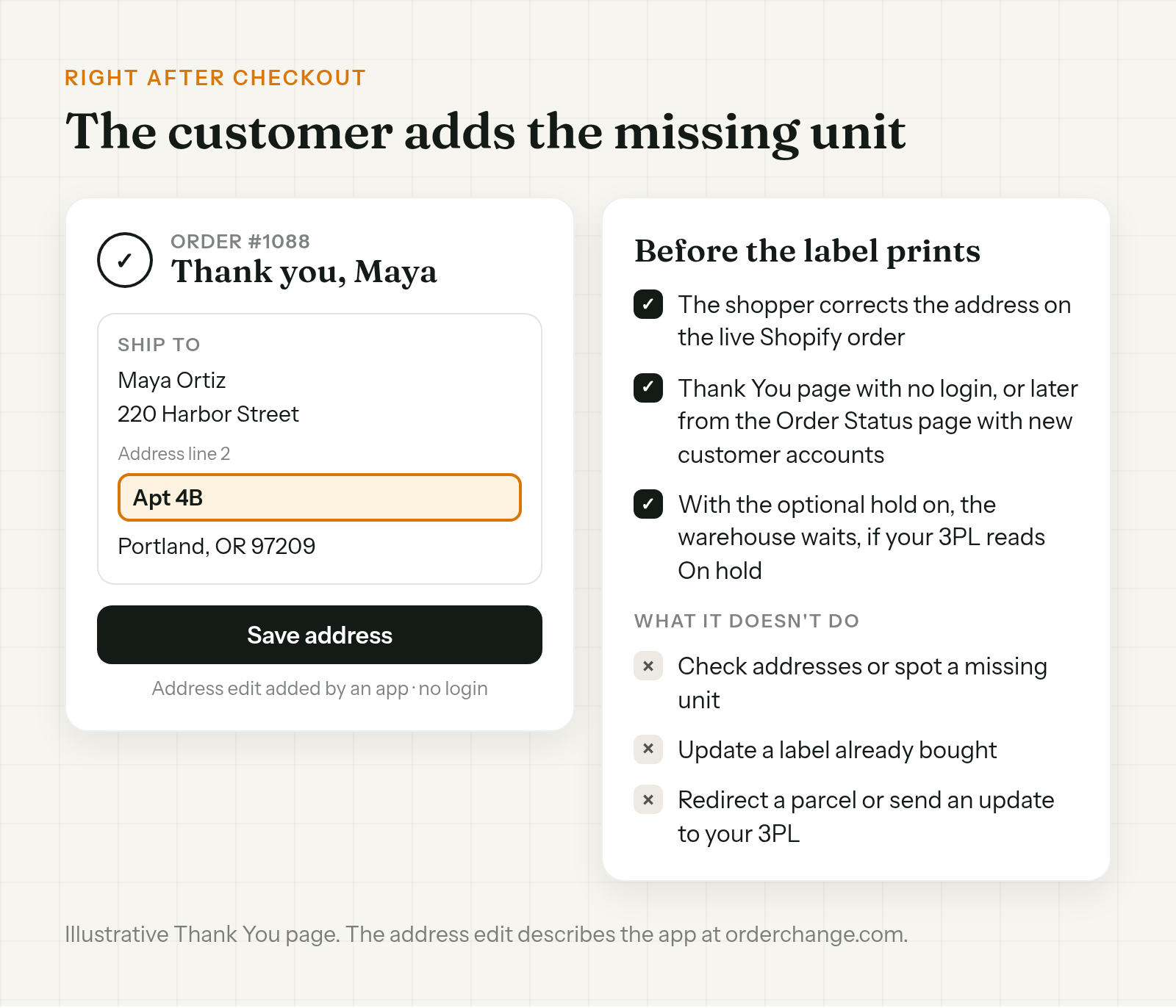
Order Change lets shoppers correct the address on the live Shopify order before fulfillment. The customer who spots the blank line 2 right after checkout can add Apt 4B on the Thank You page, with no login. If they notice later, in the confirmation email, they can fix it from the Order Status page with new customer accounts. Either way, it has to happen before the label prints. With the optional fulfillment hold on, the warehouse waits. The hold is off by default and only works if your 3PL reads On hold.
It doesn't check addresses or spot a missing unit. The customer has to notice. It doesn't update a label you've already bought or redirect a parcel. And it doesn't send a separate update to your 3PL, so a warehouse that already pulled the order may still have the old address. More at orderchange.com.
Check these either way
- Red validation errors. You can't fulfill until the address is updated.
- UK orders. The UK isn't on Shopify's validation list, so expect fewer suggestions. Check flats by eye.
- Returning customers. A saved address can predate a move. Compare line 2 with their last order.
- Free shipping orders. A reship means paying postage twice. Decide now who covers it.
FAQ
Can I add an apartment number after a Shopify order is placed?
Yes, while it's unfulfilled. Edit the shipping address on the order and put the unit in Address line 2. If a label exists or your 3PL has the order, there are extra steps.
Should I make Address line 2 required in Shopify checkout?
It's a trade-off. Shopify warns that with Required, some customers might not be able to proceed with their purchase, depending on their type of residence. Optional lets everyone through but is easy to skip.
Does Shopify check for missing apartment numbers?
It can suggest a correction when it's confident, in supported countries, and flag addresses that might not deliver. The UK isn't on Shopify's validation list, so expect fewer suggestions there. Don't count on it for a missing unit number.
The label's already printed. Can I just change the address?
No. Changing the address on the order doesn't update a label you've already bought. The label needs voiding and replacing first.
My package came back for a missing apartment number. Who pays to reship?
That's your policy. Shopify staff's options: edit the order to add a custom item for the shipping amount and collect payment, or refund and have the customer reorder, or send a draft order invoice.
Will UPS fix an incomplete address?
UPS says it will make reasonable efforts to get the correct or complete address. It charges the shipper an address correction fee when it does.
A missing apartment number on a Shopify order is an edit before the label prints and a carrier problem after. Check the validation flag and line 2 before you buy the label, ask when you're unsure, and add the unit on the order. Then set line 2 and validation at checkout knowing the trade-offs, and give customers time to spot the gap.
For stores that want customers to add a missing unit themselves before the label prints, see orderchange.com.
Related: change a shipping address
For the full edit, label void and 3PL steps, see How to change a shipping address on Shopify after an order.
Related: hold fulfillment
To keep orders out of the warehouse while customers can still fix them, see Hold fulfillment on Shopify during order edits.