Shopify Order Canceled but Still Shipped? Why It Happens and How to Stop It
A customer writes in 20 minutes after checkout. Wrong size, wants to cancel.
Easy. You cancel the order in Shopify, the refund goes back, and the cancellation email goes out.
Three days later: "Why did a parcel just turn up? I cancelled this."
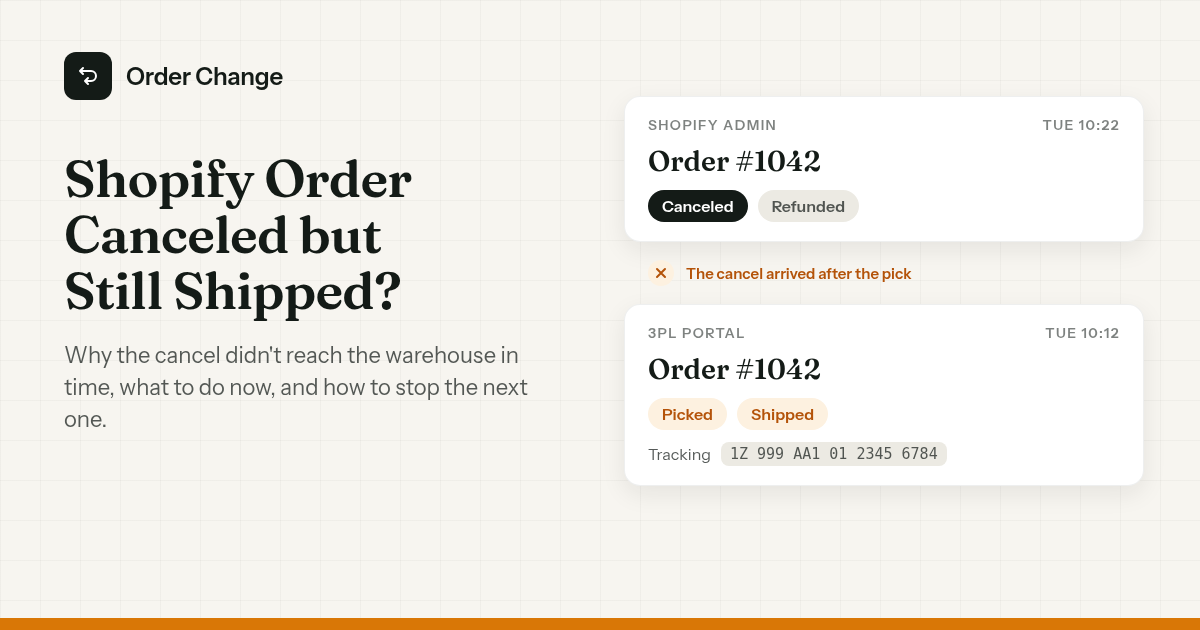
You open the order. Canceled. Refunded.
Then the 3PL portal. Shipped, with tracking, two days ago.
So your 3PL shipped a canceled order, and you've paid for the product, the pick fee and the label, and the customer has the parcel and the refund. Some will send it back. Some will keep it. Now and then someone disputes a charge you already refunded.
The short version. Once your fulfillment service has accepted an order, canceling in Shopify isn't a stop instruction. It's a cancellation request the warehouse can accept or reject, and once the order is picked or labeled, it usually ships anyway. If it already shipped, talk to the 3PL, void the label if it hasn't been used, and pick between a return and a write-off. To stop it next time, get cancels in before the warehouse has the order.
It already shipped: what to do now
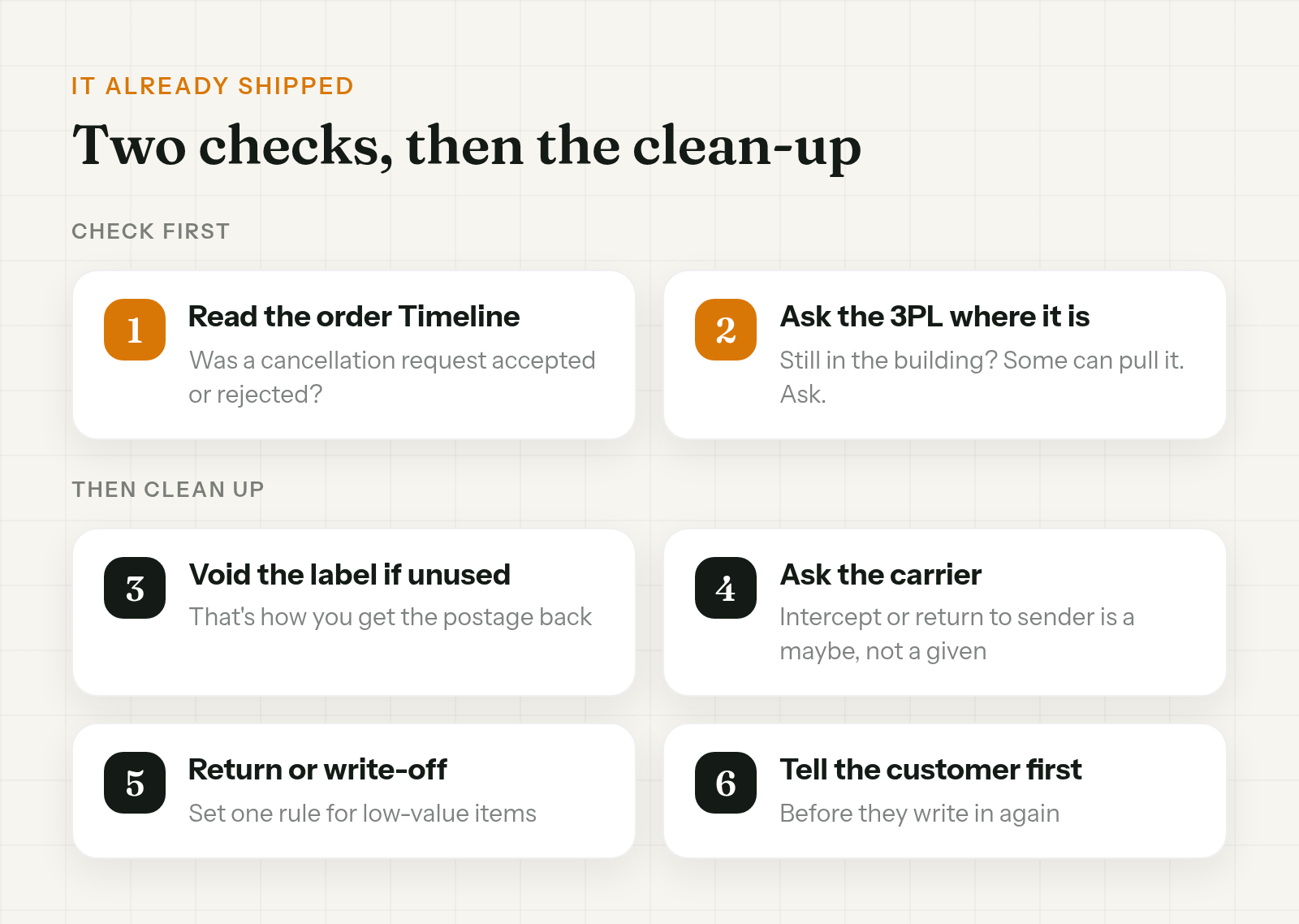
Work through these in order. The first two decide whether the rest matter.
- Check the order Timeline in Shopify. Look for a cancellation request and whether the fulfillment service accepted or rejected it. That tells you what happened and when.
- Ask the 3PL where the parcel is. If it hasn't left the building, some warehouses can still pull it. Ask. Don't assume either way.
- Void the label if it hasn't been used. If you print labels in ShipStation, voiding is how you get the postage back. ShipStation Help notes the order stays canceled even if the carrier won't void the label.
- If it's already with the carrier, you can ask about an intercept or return to sender. Whether that's possible, and what it costs, depends on the carrier and the service. Treat it as a maybe.
- Decide: return or write-off. On a low-value item, a return label plus restock handling can cost more than the item. Pick a rule for your team so nobody has to decide case by case.
- Tell the customer before they write in again. Short and plain.
A message that works:
Hi Priya, your order #1042 was cancelled and refunded on Tuesday, but it had already left our warehouse, so it's on its way to you. Sorry for the mix-up. You don't need to do anything, it's yours to keep.
Swap the last line for a prepaid return label if the item is worth getting back.
Your refund has already gone through, so that side is settled. If a parcel still needs to come back, sort that out with the customer. Don't try to recharge them on your own.
Why canceled orders still ship
Shopify Help describes canceling an order as halting order processing, so staff or fulfillment services stop working on it. That's what most of us expect the button to do.
The same page carries the catch: "If your order is being processed by a third-party fulfillment service, you might need to cancel the order through that service's system before canceling in Shopify."
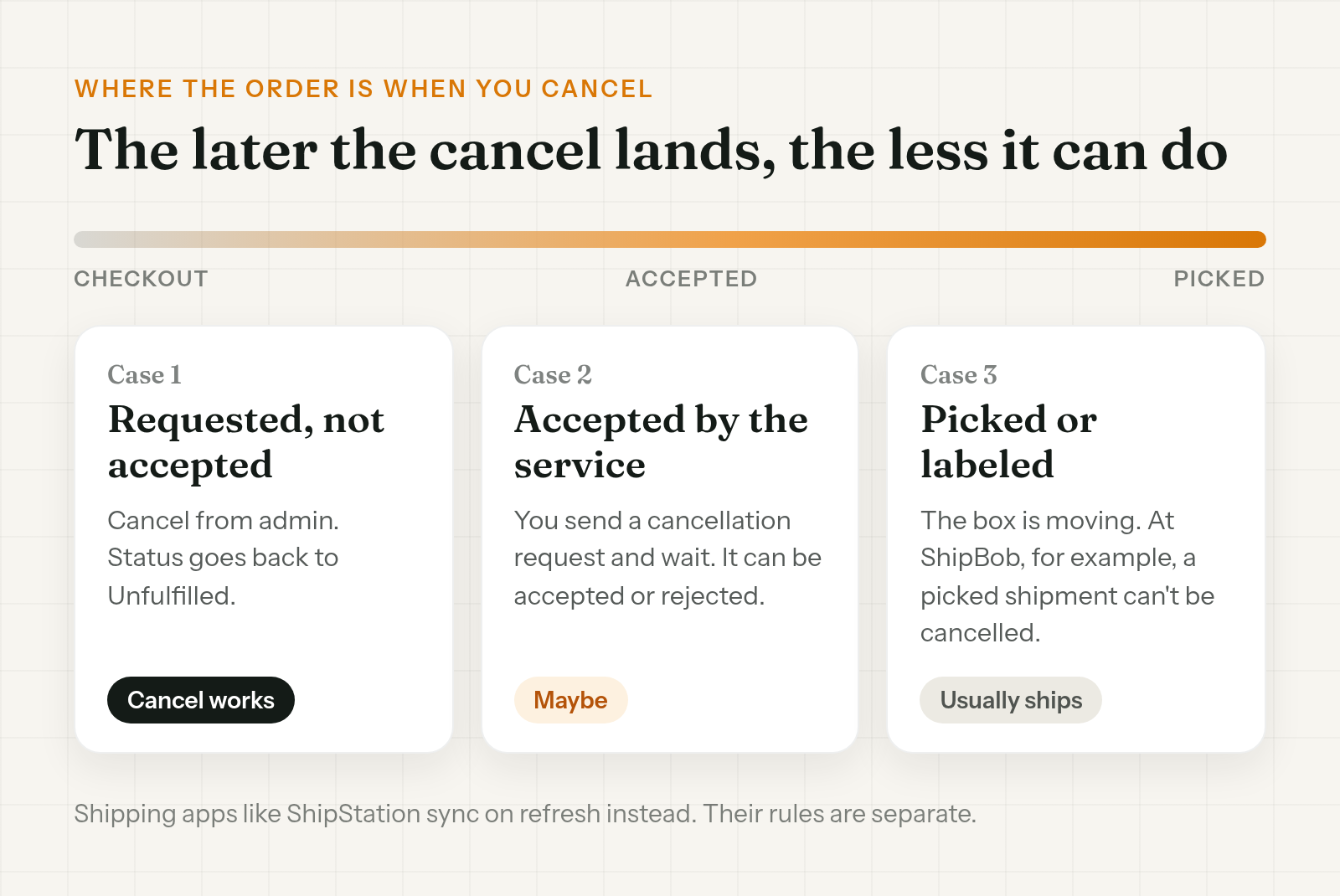
What happens depends on where the order is when someone hits Cancel. With a fulfillment service app, there are three cases.
1. Requested, not yet accepted. Shopify has sent the fulfillment request, but the service hasn't accepted it. You can cancel it straight from admin, and the status goes back to Unfulfilled. This is the case where canceling works as you'd hope.
2. Accepted. The service has taken the order. Now you can only send a cancellation request and wait for an answer. Shopify Help says that if the request is rejected, it's noted in the Timeline and "the fulfillment service continues the fulfillment process."
3. Picked or labeled. The box is already on its way, whatever Shopify says. At ShipBob, for example, orders can only be canceled before they're picked, packed or shipped. Their docs put it bluntly: "Once a shipment is Picked, it cannot be cancelled." Other 3PLs set their own cutoff, so check yours.
Shipping apps that import orders, such as ShipStation, work differently. They don't accept or reject anything. They pick up changes when they next sync with the store. More on that below.
The pattern is the same in every case. The later the cancel lands, the less it can do. That's why a customer who cancels 20 minutes after checkout can still get the parcel. If the warehouse pulled the order at minute 10, the cancel shows up after the work has started.
Read the Timeline: Cancellation requested, accepted, rejected
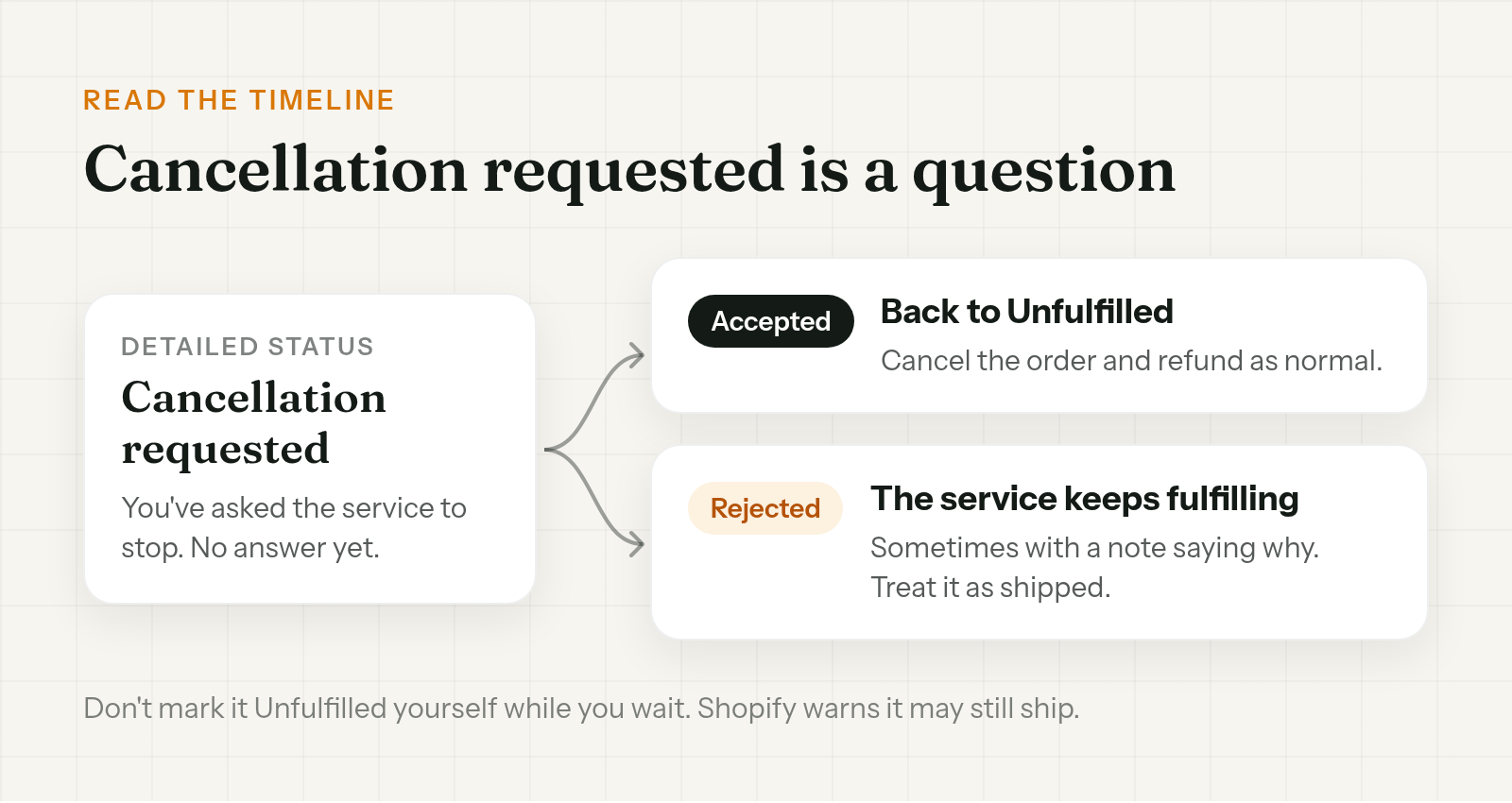
When the service has accepted the order, the order page tells you where the cancel stands. Detailed status shows Cancellation requested while you wait. The Timeline records the answer.
| What you see | What it means | What to do |
|---|---|---|
| Cancellation requested | You've asked the service to stop. No answer yet | Wait. Don't tell the customer it's stopped until you hear back |
| Request accepted | The service won't ship it. Status goes back to Unfulfilled | Cancel the order and refund as normal |
| Request rejected | The service carries on fulfilling, sometimes with a note saying why | Treat it as shipped and go to the steps above |
A rejection isn't the warehouse being difficult. Often it means the order was already picked or packed when the request came in. Read the note if there is one.
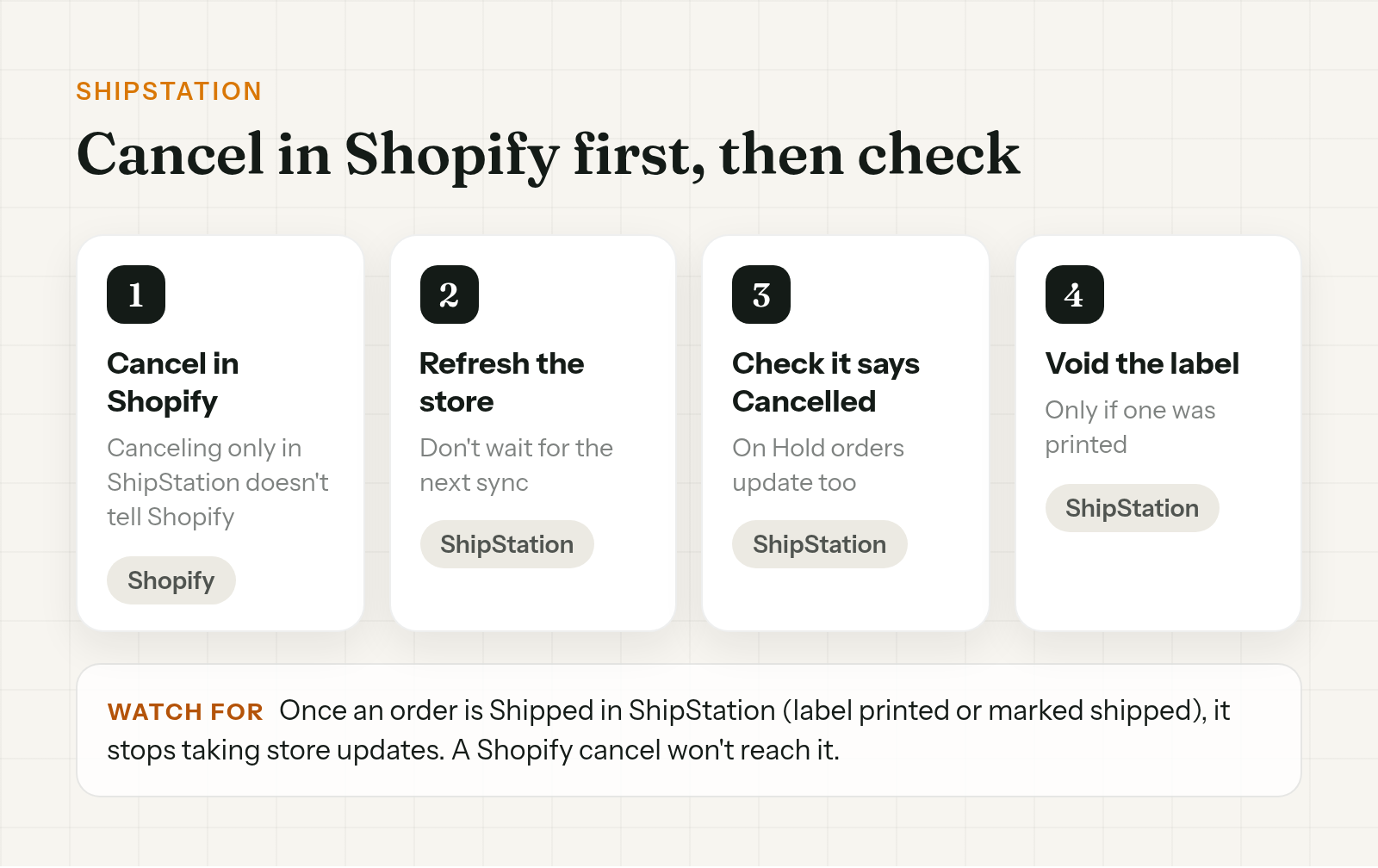
ShipStation: cancel in Shopify first, then refresh, then void the label
ShipStation imports orders from Shopify rather than accepting them, so the rules are about order and timing. From ShipStation Help:
- Cancel in Shopify first. ShipStation marks the order Cancelled on its next import or store refresh.
- Canceling only in ShipStation doesn't tell Shopify. The order stays open on your side.
- Once an order is Shipped in ShipStation, meaning a label was printed or it was marked shipped, it stops receiving store updates. A cancel in Shopify after that won't reach it.
- Orders that are On Hold in ShipStation do update to Cancelled when a store cancel comes in.
So the order of steps for a ShipStation shop:
- Cancel the order in Shopify.
- Refresh the store in ShipStation instead of waiting for the next sync.
- Check the order now shows Cancelled.
- If a label was already printed, void it.
If step 3 still shows the order as Shipped, the Shopify cancel isn't going to reach it. Go back to the already-shipped steps.
Full-service 3PLs: get the cutoff in writing
Full-service 3PLs each have their own cancel rules, and they're not always written anywhere your team can find them. ShipBob's pick cutoff is one example. Your 3PL's could be earlier or later.
Ask your account manager these questions once and save the answers in your help desk:
- How does a Shopify cancel reach you? Automatically, or do we need to email or use your portal?
- At what status can you no longer cancel? Picked, packed, labeled?
- Do you charge for a cancel after picking has started?
- How do you tell us a cancel was rejected, and where do we see it?
- How fast do you usually pull new orders from Shopify?
That last answer matters most. It tells you how long a customer realistically has to cancel before the warehouse has the order.
Don't force it
When a cancel is stuck on Cancellation requested, there are two tempting shortcuts. Neither one stops a box.
- Marking it Unfulfilled yourself. Shopify warns against doing this unless the service has confirmed it won't ship. The order may still ship, and you may still be charged.
- Force-canceling before the service answers. Shopify allows it, but shows a warning that it doesn't guarantee the service won't ship the items. You end up with a canceled order in Shopify and no answer from the warehouse.
Changing a status in Shopify changes the record. It doesn't change what's happening on the warehouse floor. Wait for the answer, or call the 3PL.
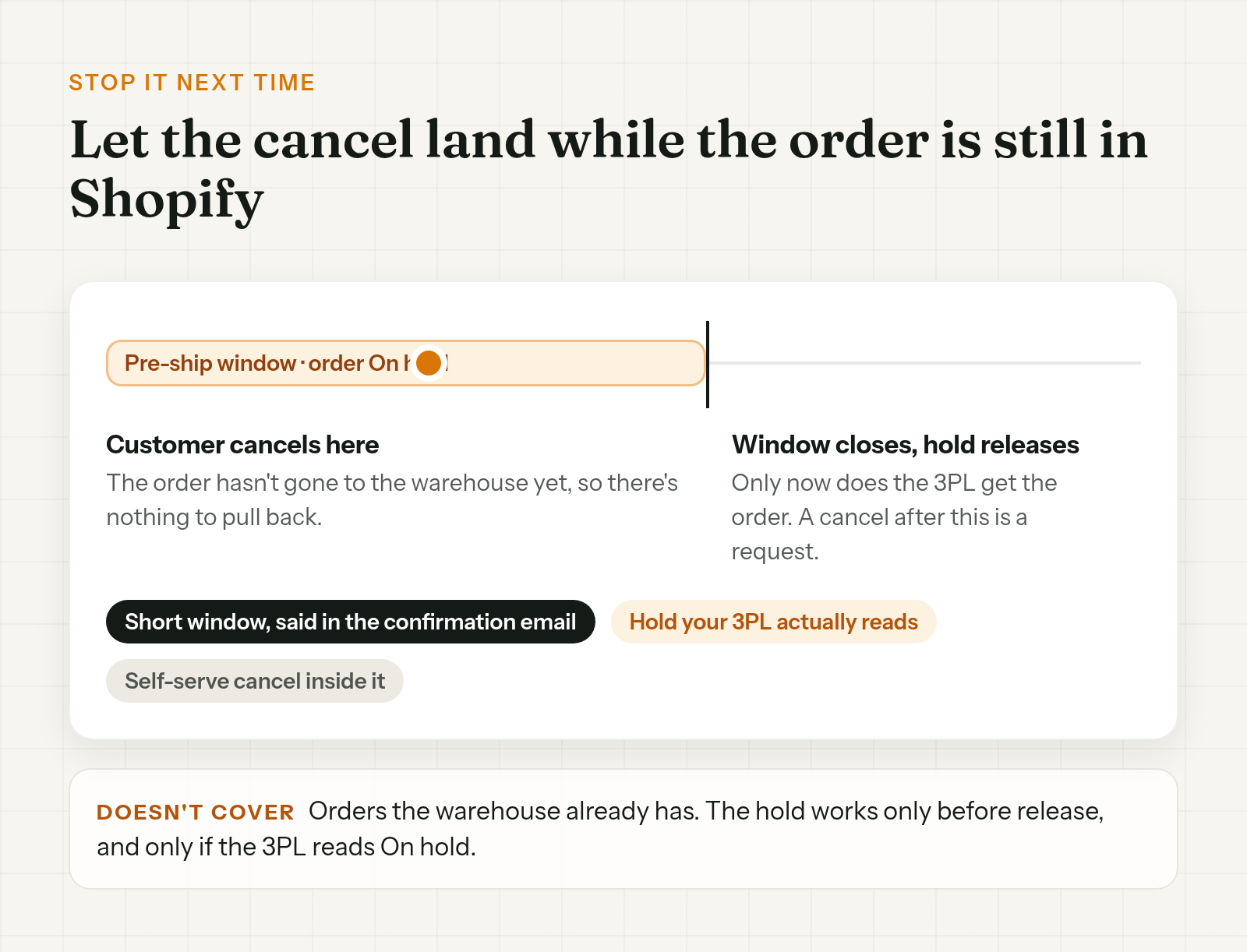
Stop it next time: get the cancel in before the warehouse has the order
A lot of canceled-but-shipped orders come down to timing. If your warehouse pulls new orders faster than customers change their minds, cancels will keep landing late.
You don't need a faster cancel button. To cancel the order before it ships, you need it to still be in Shopify when the cancel arrives.
- Set a short pre-ship window and tell customers about it in the confirmation email. "You can cancel within 30 minutes" sets an expectation your team can actually keep.
- Hold fulfillment for that window, so the order isn't released to the warehouse until it closes. That only works if your 3PL or shipping app reads Shopify's On hold status. The setup and the failure points are in how to hold fulfillment on Shopify during order edits.
- Let customers cancel on their own during the window, so a cancel doesn't sit in your inbox while the clock runs.
If the customer only wants to drop one item, that's a different fix. See how to cancel a line item on Shopify without voiding the order.
Order Change lets shoppers cancel their own order. That cancels and refunds it in Shopify straight away. It also has an optional fulfillment hold for the edit window, which is off by default and only works if your 3PL reads On hold. With both on, new orders stay out of the warehouse while customers can still cancel, so fewer cancels show up after the 3PL has the order.
It doesn't send a cancel to your 3PL. If the warehouse already has the order, everything above still applies. For timing the window, see the hold fulfillment guide. More at orderchange.com.
FAQ
Why did my canceled Shopify order still ship?
Usually the warehouse already had it. Once a fulfillment service accepts an order, canceling in Shopify sends a cancellation request it can reject. Once the order is picked or labeled, it usually ships anyway.
Does canceling in Shopify cancel it at my 3PL?
Not always. It depends on how the 3PL connects. Some pick up the cancel on their next sync, some get a request they can reject, and some need you to cancel in their own system. Shopify Help says you might need to cancel with the service before canceling in Shopify.
What does "Cancellation requested" mean?
You've asked the fulfillment service to stop, and it hasn't answered yet. The Timeline records whether it accepts or rejects the request.
Can my fulfillment service reject a cancellation?
Yes. Shopify notes the rejection in the Timeline and the service carries on fulfilling the order, sometimes with a message explaining why.
Should I refund before the 3PL confirms?
If the warehouse has already accepted the order, check with them first so you know whether a parcel is still coming and can tell the customer. If it hasn't reached the warehouse, cancel and refund as normal. If a refunded order ships anyway, you're choosing between a return and a write-off.
Can I void the shipping label?
Usually, if it hasn't been used yet. In ShipStation, voiding gets the postage back, and the order stays canceled even if the carrier won't void the label. Carrier rules vary.
When a Shopify order is canceled but still shipped, the cancel usually arrived after the warehouse had the order. Check the Timeline, ask the 3PL, void the label if it's unused, and tell the customer before they ask. Then make the next one less likely: a short pre-ship window, a hold your 3PL actually reads, and cancels that come in while the order is still in Shopify.
For teams that want customers to cancel inside that window, see orderchange.com.
Related: hold fulfillment
The hold is what keeps an order out of the warehouse while a cancel can still land. See Hold fulfillment on Shopify during order edits.
Related: cancel one item
When the customer wants to keep the order but drop one item, see Cancel a line item on Shopify without voiding the order.
Related: change shipping address
The other change that races the warehouse. See Change shipping address on Shopify after an order.